


Netlify may be a household name in computing solutions, but it’s not the best choice for every business. Its infrastructure, pricing plans, and feature limitations might be too restrictive for some projects or developers’ preferences.
So let’s look closely at what to expect from Netlify, how popular alternatives stack up, and how to decide which platform is best for your cloud computing needs.

Comparing cloud infrastructure platforms for deploying mobile and web applications, static sites, and more
It’s overwhelming to compare every detail across a huge number of platforms; that’s why we’re sharing a concise and direct comparison of each service. We’ll pit Netlify against 2 of the most worthy cloud computing alternatives, examining:
- Available features: Comprehensive list of popular or notable features for each platform.
- Available services: Not integrations — managed services. We include whether they’re 3rd party (requiring multiple subscriptions and contracts).
- Workloads supported: The ability to support your preferred developer tools and code languages could make or break your choice of platform.
- Cloud host providers: Who hosts each platform and what are the cloud options for end users?
- Available geographies: From sustainability to availability, you should know where your platform’s servers are located and where your work will be deployed.
- Security and compliance: Which tools meet the regulatory requirements for your industry when building apps, web pages, and more? How secure are they compared to alternatives?
- Continuous integration/continuous deployment (CI/CD): Automated continuous deployment saves time, enabling your team to focus on iterative improvements.
- Build time restrictions: Build limitations on your website or app can be time-consuming and costly, so you need to know upfront how each platform handles this. And when it comes to request timeouts, even a difference of a few seconds matters.
- Commitment to sustainability: By 2040, data centers may account for 14% of global greenhouse gas emissions. That’s why it’s critical to know where your provider stands on sustainability.
- Service tiers: What does scaling up from a free tier look like? Which features and functionality limitations come with each level of service?
Netlify and alternatives at a glance
We’ll start with a full rundown of each platform, and then share a condensed table to compare these tools directly.
Netlify
Netlify is a front-end platform living on the edge, literally. They serve static files directly at the edge without tapping servers. On the surface, that makes Netlify a decent choice to build and deploy static web projects — but there’s a lot more you should know.
Available features: Webhooks build triggers, Git-based deployments, global content delivery network (CDN), data unification, preview environments, visual editor asset optimization, collaboration, and atomic deployment, with add-ons for server-side analytics and metrics, customizable functions deployable as Application Programming Interface (API) endpoints, and code-free forms and submissions.
Available services: No managed services; you’ll have to integrate with other tools for data storage, large media management, search, and more.
Workloads supported: Full stack, edge functions, internet/web services, APIs, static sites, and background workers.
Cloud host providers: Netlify runs on Amazon Web Services (AWS).
Available geographies: Netlify features 70+ points of presence (POPs) globally and can deploy in 15 regions across 5 continents. Users can self-select deployments in:
- Asia Pacific (APAC): Tokyo, Singapore, Sydney
- North America: Central Canada, North Virginia, Ohio, North California, Oregon
- South America: São Paulo
- Europe: Ireland, London, and Frankfurt; Stockholm, Paris, and Milan are available through support
Security and compliance: Active distributed denial-of-service (DDoS) mitigation, secure code encryption, penetration testing, compliance data centers, free HTTPS certificates, single sign-on (SSO), and two-factor authentication (2FA). Compliant with:
- System and Organization Controls 2 Type 2 (SOC 2)
- Information Security Management 27001 (ISO 27001)
- General Data Protection Regulation (GDPR)
- California Consumer Privacy Act (CCPA)
- Payment card industry self-assessment questionnaire (PCI for SAQ-A) requirements
CI/CD: Automatic deployment with Git hooks, command-line interface (CLI), and API.
Build time restrictions: Starter 300 minutes/month, Pro 25,000 minutes/month, Enterprise custom. You can buy extra build minute packs, but minutes expire each month with no rollover. You’ll hit request timeouts at 10–26 seconds, depending on your tier.
Commitment to sustainability: Netlify doesn’t have its own sustainability initiative, deferring to its cloud providers’ sustainability policies.
Service tiers: Free Tier is single-member, 1 concurrent build, 500 projects, 100GB bandwidth, and 300 minutes/month. Pro Tier offers up to 3 concurrent builds, 500 projects, 1TB bandwidth, and 25,000 minutes/month. Enterprise plans are customized.
Upsun
Upsun is a highly customizable Platform-as-a-Service (PaaS) prioritizing ease of use, flexibility, and sustainability. Choose your repository options, then customize your project details with composable infrastructure. This customization makes Upsun one of the best Netlify alternatives: a well-rounded choice to deploy websites, apps, or any cloud computing project.
Available features: Built-in edge layer, 99.99% high availability, automatic scaling, persistent storage, no request timeout, exact preview environments that perfectly mimic production, instant provisioning, collaboration, complementary cron jobs, fine-tuned access controls, fast support response times, zero configuration, and Blackfire observability.
Available services: Upsun prioritizes in-house managed features.
- Data and object storage (internal): Managed InfluxDB, Kafka, MariaDB/MySQL, Memcached, MongoDB, Network Storage, Oracle MySQL, PostgreSQL, Redis
- Search (internal): Elasticsearch, OpenSearch, Solr
- Other (internal): Headless Chrome, RabbitMQ, Varnish, Vault KMS
Workloads supported: Full stack, databases, web services, APIs, static sites, and background workers.
Cloud host providers: Multiple available regions and data centers with renewable energy sources — users choose from AWS, Google Cloud, Microsoft Azure, Orange, or OVHcloud.
Available geographies: 17 regions, 3 continents, 5 cloud options. Choose your site and cloud to deploy:
- APAC: Sydney (AWS, Microsoft Azure)
- North America: Central Washington (Azure), South Carolina (Google, 2 AWS regions), Montreal (AWS)
- Europe: Stockholm (AWS), London (Google), Paris (OVHCloud, Azure, Orange), Frankfurt (Google), Dublin (3 AWS regions), Zurich (Google)
- Enterprise clients can access 60+ POPs globally with managed CDNs.
Security and compliance: Advanced project isolation, carriage return and line feed (CRLF) injection blocking with Upsun Web Application Firewall (WAF), request smuggling header injection, response splitting, HTTP protocol enforcement, and built-in reverse proxy cache configuration for secure DDoS protection. Gaia-X member. Compliant with:
- SOC 2 Type 2
- GDPR
- Canada’s Anti-Spam Legislation (CASL)
- Germany’s Federal Data Protection Act (BDSG)
- Personal Information Protection and Electronic Documents Act (PIPEDA)
- Australian Privacy Act (APA)
- Payment Card Industry Data Security Standard (PCI DSS) Level 1
CI/CD: Automatic deployment with Git hooks, CLI, API, and source operations (automated code updates).
Build time restrictions: No build time limits and no request timeouts — a major speed and performance advantage over other providers.
Commitment to sustainability: Upsun stands out here, too: sustainability is one of their core values. This provider offers 12x better CPU usage vs. Amazon Web Services Elastic Compute Cloud (AWS EC2). There’s even a 3% discount on resource usage when deployed to select green regions with data centers and servers powered by renewable energy.
Service tiers: Free Trial features unlimited users, 1 build, 2 environments, and 4.5 CPUs/12GB memory/20GB storage running concurrently. There are no fixed service tiers at Upsun. Instead, customize your plan with unlimited options using a transparent pricing calculator and only pay for the resources you use. Manage from your dashboard anytime. Everyone gets enterprise-ready service-level agreement (SLA), compliance, security, and access controls.
Vercel
Vercel is a cloud hosting platform to create, store, and deploy front-end frameworks and static sites. It’s optimized for Next.js and is a good option for developers choosing this framework, but it may not be the ideal solution for full-stack. Vercel offers managed databases, storage, and other options like analytics — but it relies on 3rd-party tools, which can be a hassle for enterprise-level projects.
Available features: Automated builds, build hooks, simple rollbacks, global CDN, visual editing, Edge Network, instant rollbacks, collaboration, preview environments, and frontend observability.
Available services: Vercel uses 3rd-party tools for storage and other services.
- Data and object storage (3rd party via Upstash): Managed PostgreSQL (Vercel Postgres), Redis (Vercel KV), Kafka
- Use Vercel Blob for large file storage, Edge Config for low-latency global storage
- 3rd-party integration options for other services and features (analytics, search, etc.)
Workloads supported: Mainly supports Next.js and other Javascript frameworks, along with Edge functions and static websites.
Cloud host providers: Vercel Edge Network runs on AWS.
Available geographies: 18 regions, 6 continents, 1 IaaS option. Choose your site to deploy:
- APAC: Mumbai, Hong Kong, Tokyo, Seoul, Osaka, Singapore, Sydney
- North America: Cleveland, Washington DC, Portland Oregon, San Francisco
- South America: São Paulo
- Europe: Stockholm, Paris, Dublin, Frankfurt, London
- Africa: Cape Town
- Access 100+ POPs globally
Security and compliance: Hourly backups, Advanced Encryption Standard 256 (AES-256) and HTTPS Transport Layer Security (HTTPS/TLS) 1.3 data encryption, region-based failover and resiliency testing, enterprise infrastructure isolation. Compliant with:
- SOC 2 Type 2
- ISO 27001:2013
- GDPR
- PCI DSS
- HIPAA
- EU-US Data Privacy Framework
CI/CD: Automatic deployment with Git hooks, CLI, and API.
Build time restrictions: Free Tier is 6,000 minutes/month, Pro Tier is 24,000 minutes/month, Enterprise custom. You get 45 minutes per deployment, with request timeouts at 30 seconds.
Commitment to sustainability: Vercel doesn’t have its own sustainability initiative, deferring to its cloud providers’ sustainability policies.
Service tiers: Free (Hobby) is single member, 1 concurrent build, 200 projects, 100GB bandwidth, and 6,000 minutes/month. Pro is up to 12 concurrent builds, unlimited projects, 1TB bandwidth, and 24,000 minutes/month. Enterprise offers unlimited projects with custom options.
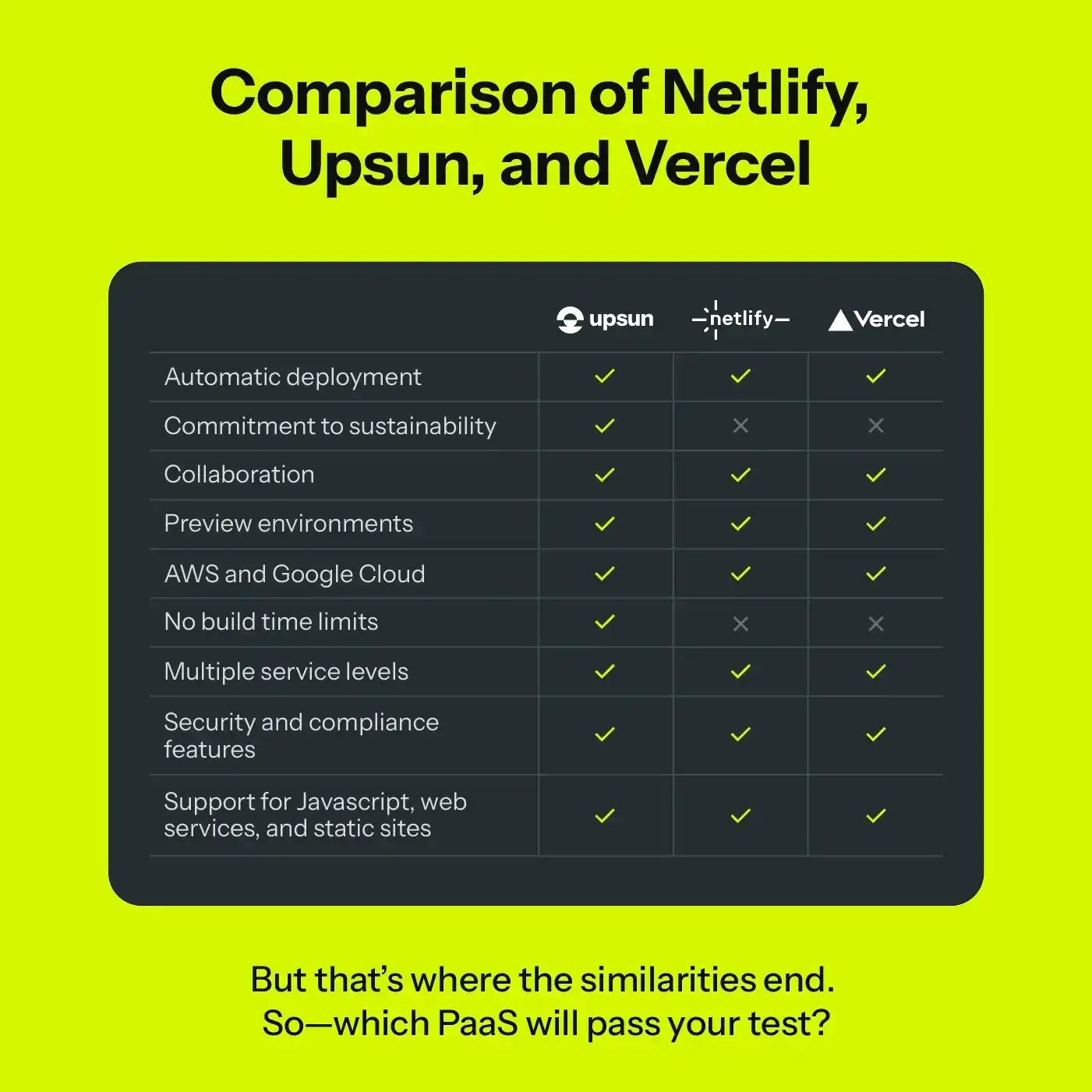
Netlify alternatives comparison table
With so much to consider when looking for Netlify alternatives, it’s easy for businesses to lose sight of what’s most important. But if you’re looking for user-friendly flexibility with fewer limitations, more transparency, and a commitment to sustainability, give Upsun a try.
Which feature, detail, or quality is a non-negotiable for you when choosing PaaS tools? Leave a comment with your thoughts.
Deploy possibility.
Try Upsun for free.
Stay updated
Upsun Cloud: compliant and validated