


Know what agents cost.
Down to the second.
No seat fees • No subscription • No API key
Free
See what Upsun Dispatch can do for your team.
20 agent-minutes a day
AI usage included, so you don't need an API key or a credit card. The included model and provider can change. Free runs on the Light AI processing level.
Connect a repository and run
One run at a time. When the day's minutes run out, running work finishes and new runs wait for midnight UTC.
Community forums and an AI assistant
Get help from the community, or ask our AI assistant any time.
No credit card needed
Pay as you go
Make Upsun Dispatch part of your workflow.
Agent time and AI usage
€0.028333 per agent-minute, plus AI usage at the AI processing level you choose. Pre-pay and top up any time.
Choose your AI processing level
Set Light, Balanced or Intensive for each workflow. No model provider account or API key needed.
Ticket support
Open a ticket with our team any time.
No training on your work
We do not use your content, inputs, or outputs to train AI models, as set out in our Terms of Service.
Only pay for what runs
How it works
You pay for the time your agents spend running and the AI usage required.

Agent time
€1.70/hour • €0.028333/minute • €0.000472/second
Billed by the second, only while an agent is running a task. Minimum charge per run: one cent.

AI usage
Upsun bills AI usage per million tokens, at the AI processing level each workflow uses. Agent time and AI usage come out of the same prepaid Upsun Dispatch resource pool.
AI processing that keeps up with the models
New models ship every few weeks, and each one changes which model and how much reasoning get the best result. With Upsun Dispatch, keeping up is our job: our engineers test every release and tune each AI processing level task by task, matching every step to the model and reasoning its complexity needs. You choose Light, Balanced or Intensive once. There’s no model provider account to open, no API keys to manage, leak or rotate, and AI usage comes out of the same prepaid resources as agent time.
AI usage pricing
Price per million tokens, by AI processing level. Prices exclude tax.
| AI processing level | Input | Cache write | Cache read | Output |
|---|---|---|---|---|
| Light | €0.94 | €1.13 | €0.09 | €3.78 |
| Balanceddefault | €3.78 | €4.72 | €0.19 | €18.89 |
| Intensive | €8.50 | €10.20 | €0.85 | €34.00 |
Example for what real work can cost
| Task example | Typical duration* | Typical cost† | |
|---|---|---|---|
| Code review on a typical PR | Less than 1 minute | Agent time: ~€0.03 | AI usage on Balanced: ~€0.35 |
| Issue to code | About 6 minutes | Agent time: ~€0.16 | AI usage on Balanced: ~€1.54 |
†AI usage shown at Balanced prices. It depends on the AI processing level and the complexity of the task. This is a non binding example of cost based on an observed average.
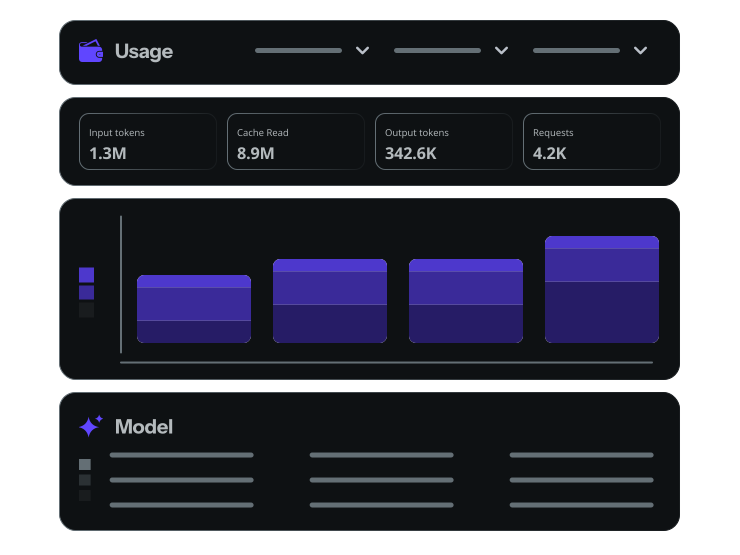
AI spend, under your control
- AI usage can be unpredictable. Your bill shouldn't be.
- Decide what you'll spend. Purchase Upsun Dispatch resources (agent time and AI usage) in advance. When you've used them all, nothing new starts.
- Let work finish. Hitting your limit shouldn't kill a job that's almost done. Work in progress is allowed to finish, so you don't lose what you've paid for.
- Know exactly where it went. Every cost is attributed to the run, workflow, and team that generated it.
FAQ
What does Upsun Dispatch cost?
Upsun Dispatch has two options. Free includes 20 agent-minutes a day, with AI usage included.
Pay as you go charges for two resources, both deducted from one prepaid resource pool:
- Agent time: the time your agents spend running, at €0.028333 per minute (€1.70 per hour), billed by the second with a minimum charge of €0.01 per run.
- AI usage: the AI processing your workflows consume, priced per million tokens at the AI processing level each workflow uses: Light, Balanced or Intensive.
No seat licenses, no feature tiers, no subscription. Your total depends on how long your agents run, the AI processing level you choose and how much work each run does.
Agent time per hour: $1.80 USD · €1.70 EUR · £1.45 GBP · A$2.80 AUD · C$2.75 CAD.
How do I keep spending under control?
You set a limit by purchasing a defined amount of Upsun Dispatch resources. Upsun Dispatch shows you exactly where those resources are used. Every cost is tied to the run, workflow, and code repo. When you hit your limit, nothing new starts, but work already running is allowed to finish.
Can I set separate budgets for different teams or clients?
Spending limits are set on your prepaid resource pool. One resource pool can be shared across multiple Upsun Dispatch organizations on the same billing profile, and each organization's usage shows separately.
Is Upsun Dispatch free to try?
Yes. Every new organization starts on Free automatically, with no credit card and no trial countdown. AI usage is included, so you don't need an API key either: connect a repository and run.
You get 20 agent-minutes a day in total. You run one workflow at a time, and a single run can use up to 20 minutes. When the day's minutes run out, running work finishes; new runs wait for the reset at midnight UTC.
Fair use applies: the included model and provider can change, and the daily allowance is reviewed every three months. For how Free usage relates to AI model training, see "Do you use my data to train AI models?" below.
Do I need my own model provider account or API key?
No. On Pay as you go, AI usage is billed through Upsun at the AI processing level you choose for each workflow, so you don't need a model provider account or an API key.
On Free, there is nothing to bring: AI usage is included on the Light AI processing level.
Which models does Upsun Dispatch use?
Upsun selects the models, weights, and effort behind each AI processing level. Our engineers run evaluations regularly, and the models and providers behind each level follow those results, so they can change over time. Free runs on our Light level. On Pay as you go, you choose Light, Balanced or Intensive for each workflow, and Balanced is the default.
Where does the AI run, and what happens to my code?
On Free and Pay as you go, Upsun Dispatch sends your run's model requests to a model provider under Upsun's contract with that provider. You do not need a provider account or an API key. Each run operates in its own single-use sandbox. No other customer or run uses that sandbox, and Upsun Dispatch removes it when the run ends. The sandbox never holds credentials. A separate proxy adds credentials to each model request on the way out. The model receives only the code and text that the agent reads for that run.
How is my usage measured?
Usage has two parts. Agent runtime is priced in agent-hours and measured to the second; an agent-minute is a minute of running agent time. AI usage is measured in tokens and priced per million at the workflow's AI processing level.
On Pay as you go, up to 10 runs can happen at the same time, and each run can last up to 90 minutes. Each run's Agent time and AI usage counts separately.
While a run waits for a human decision at an approval gate, you are not billed. Waiting at a gate costs nothing.
What is AI processing?
Each AI processing level is a set of models and reasoning settings, picked for each task in a workflow and for how complex that task is. Moving up a level puts more processing behind every task. The level applies to the whole workflow. Upsun chooses the models and reasoning settings behind each level, and they can change.
Light: Smaller models matched to each task. Suited to routine, well-scoped work. Free runs on Light.
Balanced: Larger models, with more reasoning where a task needs it. Suited to most everyday work. The default on Pay as you go.
Intensive: The most processing we offer, with larger models, deeper reasoning, and extra planning and checking on certain workflows. Suited to complex changes and high-stakes work.
On Pay as you go, you set the AI processing level for each workflow.
Why does Upsun choose the models?
Because the right model for a task changes faster than most teams can test. Our engineers evaluate new models as they're released against every Upsun Dispatch workflow, and tune each AI processing level task by task, using the model and reasoning setting that performs best on each task in those tests. You get the benefit of that work without running evaluations, managing model provider accounts or rotating API keys.
What do input, output, cache write and cache read mean?
Input is what the agent reads, such as your code, the issue and any other context you give it access to. Output is what it writes, such as review comments and code. Cache write is context stored once for reuse later in the run, and cache read is that context reused at a lower rate. What the agent writes early in a run becomes input for later steps, and is then cached.
What do typical workloads cost?
On Free, AI usage is included in your daily allowance. On Pay as you go, a typical code review takes under a minute: about €0.03 in agent time and about €0.35 in AI usage on Balanced. Cost depends on the AI processing level and how much code the agent reads.
Your codebase will vary. Your usage view itemizes every run.
Measured on Upsun's own runs; figures converted from US dollars where shown in other currencies. Your AI processing level changes the AI usage figure.
How do I pay?
You purchase agent time and AI usage in advance. Add funds, and both are deducted from your resource pool as your agents run. No subscription, no monthly fee. Funds are valid for 12 months from purchase. Prices exclude tax; any applicable taxes are added at purchase.
What happens when my resource pool runs out?
New runs don't start once your resources fall to €1 or less. We notify you before that, and you can add funds manually or turn on automatic top-ups. Work already running is allowed to finish, so your resource pool can dip below zero. The overrun appears in your usage view like every other cost and is deducted from your next purchase. We would rather show you a small negative number than throw away your work.
What happens to my free minutes if I upgrade?
When you upgrade, agent time and AI usage are deducted from your prepaid resource pool, and the free daily 20 minutes no longer applies.
Free minutes never accumulate. Upgrading is permanent: a paid organization can't return to Free.
Do you use my data to train AI models?
On Pay as you go, we do not use your content, inputs, or outputs to train AI models, unless you have given us prior consent, as set out in our Terms of Service.
Free works differently. In exchange for free agent time, Upsun may use content, inputs, outputs, and usage data from your Free usage to train AI models, as set out in our Service Specific Terms.
What support is included?
Pay as you go includes ticket support. Free includes our community forums and an AI assistant.
Which currencies do you support?
Upsun Dispatch supports USD, CAD, GBP, EUR, and AUD.
I use Upsun Cloud. How does Upsun Dispatch relate?
Upsun Cloud and Upsun Dispatch are separate products, each with its own pricing. Upsun Cloud charges for the infrastructure your applications run on. Upsun Dispatch charges for the time your AI agents spend running for you and the AI usage they consume. You can use either product independently, or use them together.
We're a larger organization. Can we talk to someone?
Yes. If you're planning a larger rollout or have specific requirements, talk to us.
Start free. No API key, no credit card needed.
Running Upsun Dispatch across a larger organization? Talk to us.
Stay updated
Upsun Cloud: compliant and validated