


What are environment variables? How they work, with examples
TL;DR
|
An environment variable is a value that lives outside your code, in the environment the program runs in, and that the program can look up by name. Instead of writing your database password into the code, you store it in a variable called DATABASE_PASSWORD, and the code asks for it when it starts.
You've probably been told to "set an environment variable" when installing a tool, connecting an API, or setting up an AI coding assistant. This guide explains what that means, how to set and read variables, and how to handle the ones that hold secrets.
How environment variables work
Key takeaway: the code stays the same everywhere, and each environment supplies its own values.

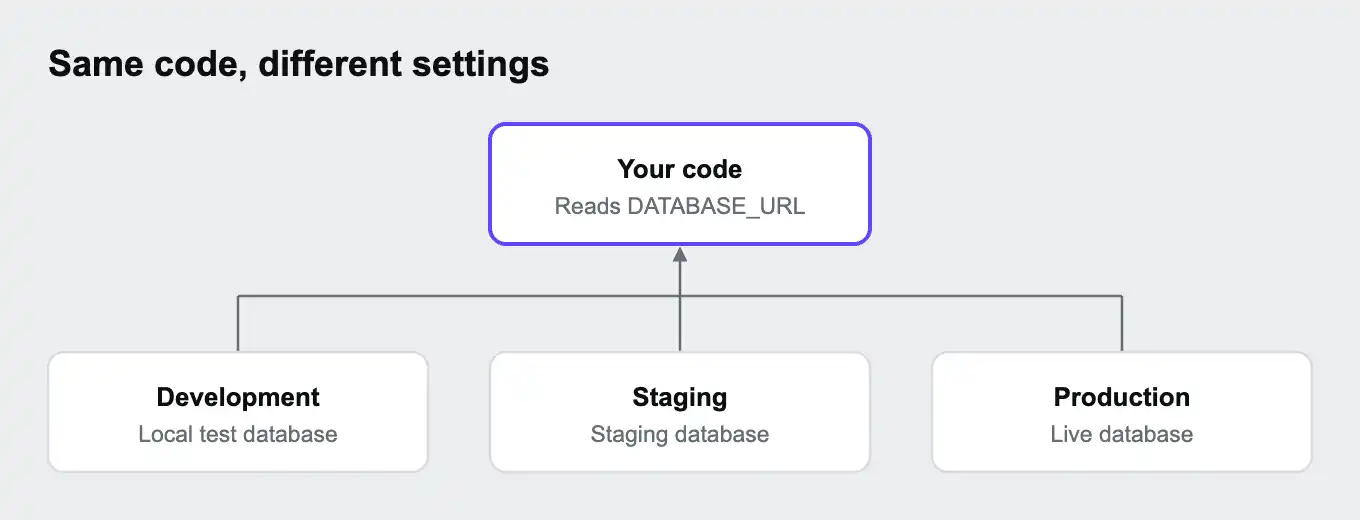
Every running program has a set of environment variables, each a name and a value, such as PORT=3000. When one program starts another, the new program receives a copy of those variables. Your terminal, your code editor, and your hosting platform all pass variables to the apps they start this way.
That's what makes environment variables useful. The same code can run on your laptop, in a test environment, and in production, and each place supplies different values:
| Variable | On your laptop | In production |
|---|---|---|
DATABASE_URL | A local test database | The live database |
DEBUG | true, to show detailed errors | false, so visitors never see them |
PAYMENT_API_KEY | A test key from the payment provider | The live key |
By convention, names are written in capitals with underscores, such as API_BASE_URL.
Setting and reading environment variables
Key takeaway: setting a variable depends on where your app runs. Reading one is a single line in any language.
Setting a variable for the current terminal session:
| System | Command |
|---|---|
| macOS and Linux | export API_KEY="your-key" |
| Windows PowerShell | $env:API_KEY = "your-key" |
| Windows Command Prompt | set API_KEY=your-key |
These last until you close the terminal. For local projects, many developers keep variables in a .env file instead, which a library loads when the app starts. Our guide What is .env? explains how those files work.
Reading a variable in code:
| Language | Code |
|---|---|
| JavaScript (Node.js) | process.env.API_KEY |
| Python | os.environ.get("API_KEY") |
| PHP | getenv('API_KEY') |
| Ruby | ENV["API_KEY"] |
| Go | os.Getenv("API_KEY") |
Many apps read their variables once, when they start. If you change a variable, restart the app for it to take effect.
What environment variables are used for
Key takeaway: anything that changes between environments, or shouldn't be in the code, belongs in an environment variable.
| Use | Example |
|---|---|
| Connection details | Database addresses, cache servers, outside services |
| Secrets | Passwords, API keys, access tokens |
| Feature switches | DEBUG=true, or turning a feature on in one environment only |
| Environment names | APP_ENV=production, NODE_ENV=production |
| Service settings | Which port to listen on, where to send emails |
| Tool configuration | API keys for AI coding tools, cloud command line tools, and package managers |
Environment variables vs secrets
Key takeaway: an environment variable is a way of delivering a value. A secret is a value that needs protecting. Many secrets are delivered as environment variables, but they need extra care.
The two terms describe different things:
| Environment variable | Secret | |
|---|---|---|
| What it describes | How a value reaches your app | How sensitive the value is |
| Examples | PORT, DEBUG, DATABASE_URL | Passwords, API keys, private keys |
| Safe to show? | Often | Never |
Environment variables are a reasonable way to deliver secrets, because they keep secrets out of your code. But anything that can read the environment can read the secret, so a few risks are worth knowing:
| Risk | What happens |
|---|---|
| Logs and error pages | Code that prints all variables, or error pages that show them, exposes secrets |
| Programs your app starts | Child programs receive a copy of every variable, including secrets |
| AI coding tools | Agents working in your project can often read your .env file and your environment, and may include what they find in their output |
| Front-end code | Variables built into browser code are visible to every visitor |
For high-value secrets, teams often use a secrets manager, a dedicated service that stores secrets encrypted and controls who can read them, and keeps an audit record. Many still deliver the secret to the app as an environment variable at the last step.
Common mistakes
Key takeaway: many leaks come from secrets ending up somewhere public: Git, the browser, or logs.
| Mistake | What happens | How to avoid it |
|---|---|---|
| Committing a .env file | Your secrets end up in Git, where everyone with access can read them, forever in the history | Add .env to .gitignore. Our guide What is a .gitignore file? shows how. If it's already committed, change the secrets |
| Putting secrets in front-end variables | Frameworks build variables with names like NEXT_PUBLIC_ or VITE_ into code sent to the browser, where anyone can read them | Only use those prefixes for values that are safe to be public. Our guide What is an API key? covers this in detail |
| Printing variables in logs | Secrets appear in log files and monitoring tools | Never log all variables, and mask secrets in error reports |
| Forgetting to restart | The app keeps using the old value | Restart or redeploy after changing a variable |
| No check for missing variables | The app starts, then fails later with a confusing error | Check that required variables exist when the app starts |
| Letting AI agents read everything | A coding agent copies a secret into a file, a message, or a pull request | Keep real secrets out of local .env files where possible, and tell agents what to avoid in an AGENTS.md file. Our guide AGENTS.md vs CLAUDE.md vs .cursorrules: which AI instruction file do you need? explains how |
Environment variables on Upsun Cloud
Key takeaway: on Upsun Cloud, you set variables per project or per environment, mark secrets as sensitive, and the platform provides connection details automatically.
Upsun Cloud apps don't read .env files. Instead, according to the Upsun docs on variables, you set variables at four levels, and when two have the same name, the higher level wins:
| Level | Who sets it | Good for | Precedence |
|---|---|---|---|
| Upsun Cloud-provided | The platform | Information about your project, such as database connection details | Highest |
| Environment | You | Values that differ per environment, such as test and live payment keys | Second |
| Project | You | Secrets that are the same in every environment | Third |
| Application | You, in .upsun/config.yaml | Non-secret settings that should be versioned with your code | Lowest |
Values in .upsun/config.yaml are committed to Git, so keep secrets out of it. Set them as project or environment variables instead:
upsun variable:create --level project --name env:PAYMENT_API_KEY --value "sk_test_..." --sensitive true
upsun variable:create --level environment --environment main --name env:PAYMENT_API_KEY --value "sk_live_..." --sensitive true --inheritable false
A few details from the docs:
- The
env:prefix makes the variable available to your app as an ordinary environment variable, such asPAYMENT_API_KEY. - Sensitive variables are hidden in the Console and in command line output, but your app can still read them. Once a variable is marked sensitive, it can't be switched back.
- You can choose whether a variable is available during the build, at runtime, or both, and limit it to specific apps.
- Environment variables are inherited by child environments unless you turn inheritance off. That's why the example above sets the test key as a project variable and the live key on main with inheritance turned off, so previews never get the live key.
- Changes to project variables take effect after you redeploy.
- Connection details for services such as databases are provided automatically, so you don't set them yourself.
You can deploy on Upsun Cloud free for 15 days, with no card needed, or see how security and compliance work on Upsun Cloud.
Frequently asked questions
What is an environment variable in simple terms?
A named setting that a program reads from its surroundings, instead of having the value written into its code.
What is the difference between an environment variable and a .env file?
A .env file is a convenient way to store environment variables for local development. A library reads the file and loads its values as environment variables when the app starts.
Are environment variables secure?
They're safer than putting secrets in code, but not secret by default. Anything that can read the app's environment can read them, so keep them out of logs, front-end code, and Git.
How do I see my environment variables?
Run env on macOS and Linux, or Get-ChildItem Env: in Windows PowerShell. Avoid sharing the output, because it may contain secrets.
Why isn't my environment variable working?
Common causes are a typo in the name, forgetting to restart the app, setting it in a different terminal session, or setting it at build time when the app reads it at runtime.
Should I use environment variables for API keys?
Yes, for server-side code. Never put secret API keys in variables that are built into browser code, because every visitor can read them.
Deploy possibility.
Try Upsun for free.
Stay updated
Upsun Cloud: compliant and validated