


TL;DR
|
An agent skill is a packaged set of instructions that an AI coding agent can pick up when it needs to do a particular job, such as writing release notes, following your team's testing process, or deploying to a specific platform. It lives in a folder with a file called SKILL.md, plus any scripts or reference documents the job needs.
Skills solve a simple problem: agents know a lot in general, but not how your team, your tools, or your platform do things. This guide explains how skills work, how they differ from AGENTS.md and MCP, how to write one, and what to check before installing someone else's.
How agent skills work
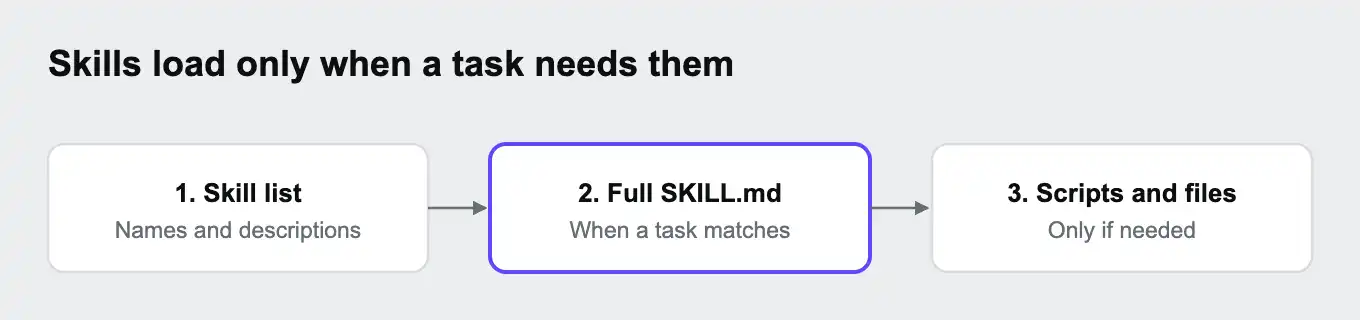
Key takeaway: skills load in stages. Agents see every skill's name and description, and read the rest only when a task needs it.

A skill's folder looks like this:
release-notes/
├── SKILL.md        # Required: a short header plus instructions
├── scripts/        # Optional: code the agent can run
└── references/     # Optional: documents the agent can read
Agents load skills in three stages, an approach often called progressive disclosure:
- At the start, the agent sees only each skill's name and one-line description. That's cheap, so it can know about many skills at once.
- When a task matches a skill's description, the agent reads that skill's full SKILL.md.
- If the instructions point to scripts or reference files, the agent opens only the ones it needs.
This keeps the agent's working memory free for your actual task, instead of filling it with instructions that don't apply.
What's in a SKILL.md file
Key takeaway: a SKILL.md has a short header with a name and description, then plain Markdown instructions.
---
name: release-notes
description: Writes release notes from merged pull requests. Use when the user asks for release notes or a changelog.
---

# Writing release notes

1. List the pull requests merged since the last release tag.
2. Group them under Features, Fixes, and Other changes.
3. Write one plain-English line per change, aimed at users, not developers.
4. Leave out internal refactors and dependency updates.
5. Save the result to `CHANGELOG.md`, newest release at the top.| Part | What it does | Tips |
|---|---|---|
name | Identifies the skill | Short, lowercase, words joined with hyphens |
description | Tells the agent when to use the skill | The most important line. Say what it does and when to use it |
| Instructions | The steps the agent follows | Specific and short. Point to scripts or reference files rather than pasting everything in |
The description decides whether the skill is ever used. A vague one, such as "Helps with docs", means the agent won't know when to reach for it.
Skills vs AGENTS.md vs MCP
Key takeaway: AGENTS.md is always-on project guidance, skills are on-demand know-how for specific tasks, and MCP connects agents to outside tools and data.
| AGENTS.md | Agent skills | MCP servers | |
|---|---|---|---|
| What it is | One instruction file for a project | Folders of instructions for specific tasks | Connections to outside tools and data |
| When the agent reads it | For every task | Only when a task matches the skill's description | When the agent decides to use a tool |
| Best for | Commands, conventions, and warnings that always apply | Repeatable procedures, such as a release process or a deployment routine | Taking actions in other systems, such as a ticket tracker or cloud platform |
| Can include code | No | Yes, scripts the agent can run | The server itself is code, running separately |
They work well together. AGENTS.md sets the ground rules, skills teach specific procedures, and MCP servers give the agent access to the systems it needs. Our guides AGENTS.md vs CLAUDE.md vs .cursorrules and What is an MCP server? A plain-English guide cover the other two.
Where skills come from
Key takeaway: Anthropic created the format, then released it as an open standard, and many coding agents now read it.
Anthropic introduced agent skills for Claude in October 2025, then published the format as an open standard at agentskills.io in December 2025. Other tools followed, including OpenAI Codex, GitHub Copilot, Cursor, Gemini CLI, and JetBrains Junie, so a skill written once can work across many agents.
Each tool looks for skills in its own folder, such as .claude/skills/ for Claude Code, and many also check a shared .agents/skills/ folder in the project. Check your tool's documentation for where it looks, because support is changing quickly.
Writing a good skill
Key takeaway: write skills for tasks you repeat, keep them focused, and test them on real work.
| Do | Avoid |
|---|---|
| One skill per job, such as "release notes" or "database migrations" | One giant skill covering everything |
| A description that says when to use it | Vague descriptions the agent can't match to a task |
| Short, numbered steps | Long background explanations |
| Scripts for steps that must be exact every time | Asking the agent to retype complex commands from memory |
| Testing it on a real task, and refining it | Writing it once and never checking whether it helps |
A good candidate for a skill is anything you've explained to an agent more than twice.
Installing skills safely
Key takeaway: a skill can contain scripts that run on your machine, so treat it like code from the internet.
Skills are easy to share, which also makes them easy to abuse. Before installing one:
- Check where it comes from, and prefer skills from the tool's maker, a company you trust, or your own team.
- Read the SKILL.md and any scripts, looking for commands that send data elsewhere, delete files, or change system settings.
- Watch for instructions that tell the agent to ignore other rules or skip asking for approval.
- Keep skills in version control, so changes are reviewed like code.
Running agents in an isolated environment limits the damage if a skill turns out to be harmful. Our guide What is an AI agent sandbox? explains how.
Upsun Skills
Key takeaway: Upsun Skills teaches coding agents the Upsun Cloud command line tool, with safety checks for risky operations.
Upsun Skills is an open source skill that gives AI coding agents, such as Claude Code, access to more than 130 Upsun Cloud CLI commands across 30 areas. According to the Upsun docs, it covers:
| Area | What your agent can do |
|---|---|
| Environments | Push, branch, merge, and sync, with production safety patterns |
| Backups | Create backups, verify them, and restore with confirmation checks |
| Databases | Manage PostgreSQL, MongoDB, Redis, and Valkey services |
| Scaling and configuration | Adjust resources, manage domains, and configure autoscaling |
To install it as a Claude Code plugin:
claude plugin marketplace add upsun/ai
claude plugin install upsun@upsun
For Cursor, VS Code, Windsurf, and other agents that support skills.sh:
npx skills add https://github.com/upsun/ai --skill upsunThe source is on GitHub, so you can review it before installing, as recommended above. For agents that work through MCP instead, the Upsun Cloud MCP server offers project management through AI assistants, read-only by default.
You can deploy on Upsun Cloud free for 15 days, with no card needed, or see how AI and automation work on Upsun Cloud.
Frequently asked questions
What is a SKILL.md file?
The main file of an agent skill. It has a short header with the skill's name and description, followed by instructions the agent follows when the skill is relevant.
What is the difference between a skill and AGENTS.md?
AGENTS.md is read for every task in a project. A skill is read only when a task matches its description, so it suits specific procedures rather than general rules.
What is the difference between skills and MCP?
Skills teach an agent how to do something. MCP servers give an agent access to outside tools and data. An agent can use both together.
Which tools support agent skills?
Many coding agents, including Claude Code, OpenAI Codex, GitHub Copilot, Cursor, Gemini CLI, and JetBrains Junie. Check each tool's documentation for where it looks for skills.
Are agent skills safe?
As safe as the code inside them. Skills can include scripts that run on your machine, so install only skills you've reviewed or that come from sources you trust.
Can I write my own skills?
Yes. Create a folder with a SKILL.md file containing a name, a description of when to use it, and the instructions. Test it on a real task and refine it.
Deploy possibility.
Try Upsun for free.
Stay updated
Upsun Cloud: compliant and validated