


What happens during a deployment? Build, deploy, and post-deploy explained
TL;DR
|
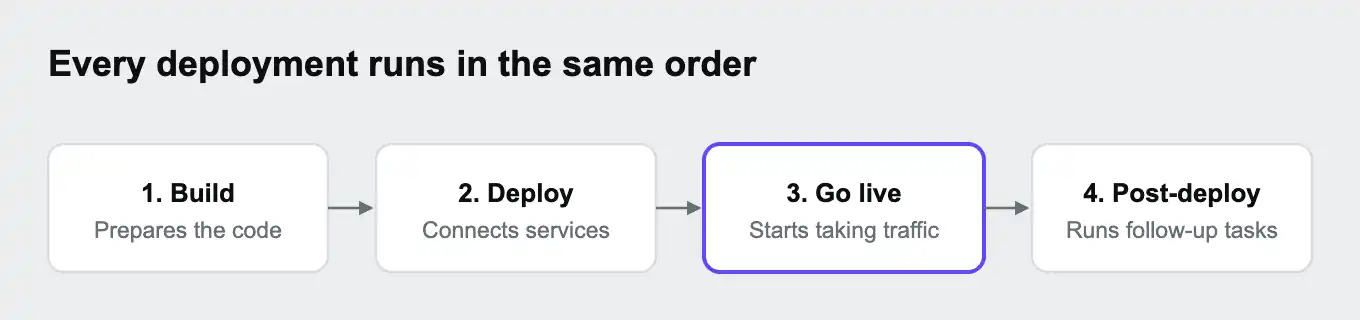
A deployment is everything that happens between pushing new code and the new version serving real users. Most platforms split it into the same three phases: build the code, deploy it, then run any follow-up tasks.
Knowing what happens in each phase explains a lot of everyday questions. Why can't the build reach the database? Where should database changes run? Why did the site pause during the last release? This guide covers each phase, where common tasks belong, and the mistakes that slow deployments down.
The three phases of a deployment
Key takeaway: the build prepares the code, the deploy phase gets it ready for traffic, and post-deploy tasks run once visitors can already use it.

| Phase | What happens | Can it reach the database? | Typical tasks |
|---|---|---|---|
| Build | The code is turned into a package that's ready to run | Usually not | Installing dependencies, compiling assets, generating files |
| Deploy | The new version starts and connects to its services, before traffic arrives | Yes | Database migrations, clearing old caches |
| Post-deploy | The new version is live and serving visitors | Yes | Warming caches, sending notifications, rebuilding search indexes |
Build: preparing the code
Key takeaway: the build turns code into a self-contained package. Because it's built once and can be reused, it shouldn't depend on any one environment's data.
During the build, the platform takes the code from your repository and prepares everything the app needs to run. That usually means installing the packages listed in your lock file, compiling front-end files such as JavaScript and CSS, and generating any files the app expects to find.
The build usually can't reach the database, and that's deliberate. A build depends only on the code, so the same build can run in a test environment and in production. If it read from a database, it would behave differently depending on where it ran. Our guide What is a lock file? explains how builds install the same package versions every time.
If the build fails, the deployment stops there, and the version that's already running stays in place.
Deploy: getting ready for traffic
Key takeaway: the deploy phase connects the new version to its database and services and runs anything that must finish before visitors arrive.
Once the build succeeds, the platform starts the new version and connects it to the database, cache, and other services. Before sending it any traffic, it runs the deploy tasks. The classic example is a database migration: a script that updates the database's structure to match the new code, such as adding a column.
Tasks in this phase hold up the release, because traffic waits until they finish. Keep them to what genuinely has to happen first.
Whether visitors notice a pause depends on the deployment strategy. With a simple stop-start approach, the old version stops before the new one is ready, which can cause a short interruption. Zero-downtime strategies keep a version running throughout.
Post-deploy: after going live
Key takeaway: post-deploy tasks run while visitors are already using the new version, so put anything there that doesn't need to block the release.
Some tasks are useful but don't need to finish before visitors arrive. Warming a cache, so the first visitors get fast pages, is a common one. So are sending a release notification to a team chat and rebuilding a search index.
Running these after the release keeps deployments short. The trade-off is that the new version is already live while they run, so they shouldn't do anything the site depends on to work correctly.
Where common tasks belong
Key takeaway: if a task needs the database, it can't go in the build. If visitors depend on it, it can't wait until post-deploy.
| Task | Phase | Why |
|---|---|---|
| Install dependencies | Build | Depends only on the code and lock file |
| Compile JavaScript and CSS | Build | Depends only on the code |
| Run database migrations | Deploy | Needs the database, and the new code depends on the result |
| Clear outdated caches | Deploy | Old cached data could break the new version |
| Warm caches | Post-deploy | Helpful, but the site works without it |
| Send a release notification | Post-deploy | Nothing depends on it |
| Rebuild a search index | Post-deploy | Can take a while, and the site keeps working meanwhile |
Common deployment mistakes
Key takeaway: many slow or failing deployments come from a task in the wrong phase.
| Mistake | What happens | How to avoid it |
|---|---|---|
| A build step that needs the database | The build fails, because the database isn't available yet | Move the step to the deploy phase |
| Long tasks in the deploy phase | Every release takes longer, and with stop-start deployments visitors may wait | Move anything that can wait to post-deploy |
| Writing files after the build | On many platforms the built code is read-only once deployed, so the write fails | Write to storage set aside for files your app creates at runtime |
| A failure that goes unnoticed | A script continues after an error and reports success | Make scripts stop on the first error |
| Database changes that break the old version | During a zero-downtime release, the old version briefly runs against the new database structure and fails | Make database changes in small steps that both versions can handle |
Build, deploy, and post-deploy on Upsun Cloud
Key takeaway: on Upsun Cloud, each phase has its own hook in .upsun/config.yaml, and the order is fixed and documented.
On Upsun Cloud, you set the commands for each phase with three hooks in .upsun/config.yaml:
applications:
  myapp:
    type: "php:8.4"
    hooks:
      build: |
        set -e
        php bin/console assets:install public
      deploy: |
        set -e
        php bin/console doctrine:migrations:migrate --no-interaction
      post_deploy: |
        set -e
        php bin/console cache:warmup
The Upsun docs list the exact order for an app on a single-runtime image:
- Variables available at build time are set.
- The default build steps for the language run, if any.
- Dependencies are installed.
- The build hook runs.
- The file system becomes read-only, except for mounts.
- The app container starts, and runtime variables and services become available.
- The deploy hook runs.
- The app starts accepting requests.
- The
post_deployhook runs.
A few details follow from that order:
| Detail | What it means for you |
|---|---|
| Services become available at step 6 | The build hook can't reach the database. Put migrations in the deploy hook |
| The file system is read-only after the build | Write runtime files to a mount |
| The deploy hook runs before requests are accepted | Keep it short, because the release waits for it |
| Hooks only fail if their last command fails | Start each hook with set -e, as in the example, so it stops at the first error |
| A failing build hook stops the deployment | The running version stays in place |
| A failing deploy hook doesn't stop the deployment | Check the deploy log after each release |
| Workers only run the build hook | Run migrations from the web app, not from workers |
| If only the environment changes, not the code | Only the post_deploy hook runs |
For the full picture, including the pre_start, start, and post_start commands, read the Dev Center post Upsun deployment hooks and commands: which one to use, and when. Our guide What is a YAML file? explains how to read the configuration file.
You can deploy on Upsun Cloud free for 15 days, with no card needed, or see how Git-driven automation runs these phases on every push.
Frequently asked questions
What is the difference between build and deploy?
The build prepares the code into a package that's ready to run, without access to the database. The deploy phase starts that package, connects it to the database and other services, and gets it ready for traffic.
Where should database migrations run?
In the deploy phase. Migrations need the database, which usually isn't available during the build, and the new code needs them finished before it serves visitors.
Why can't my build connect to the database?
Builds are designed to depend only on your code, so the same build can run anywhere. Most platforms don't connect services until the deploy phase.
What is a post-deploy hook used for?
Tasks that should happen after the new version is live but that nothing depends on, such as warming caches, sending notifications, or rebuilding search indexes.
Does a deployment cause downtime?
It depends on the strategy. A stop-start deployment can briefly interrupt the site, while zero-downtime strategies keep a version serving visitors throughout.
Deploy possibility.
Try Upsun for free.
Stay updated
Upsun Cloud: compliant and validated