


TL;DR
|
Web apps often have work that shouldn't happen while a visitor waits: sending emails, resizing images, generating reports, cleaning up old data. There are two main ways to run that work outside a web request: on a schedule with a cron job, or as a background job when something happens.
They're often confused, and many apps need both. This guide explains the difference, when to use each, how they work together, and the mistakes to avoid.
The difference in one sentence
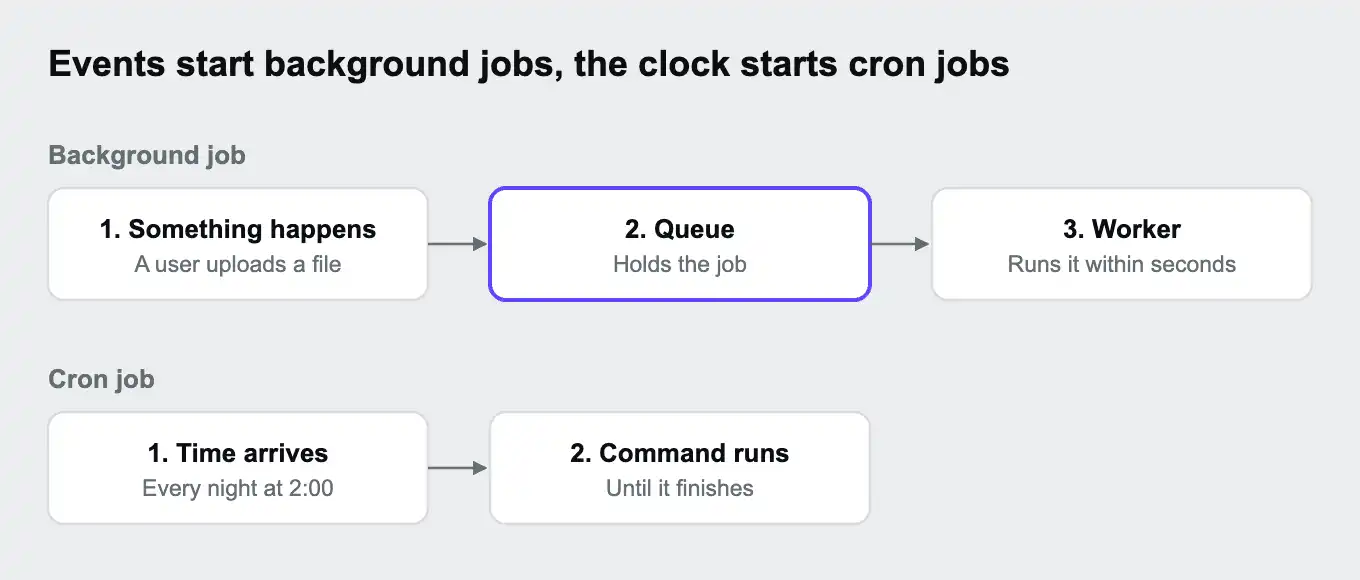
Key takeaway: the clock starts a cron job. An event starts a background job.

| Cron job | Background job | |
|---|---|---|
| Starts when | A scheduled time arrives | Something happens, such as a user action |
| Typical example | Clean up expired sessions every night | Send a welcome email when someone signs up |
| How it runs | The scheduler runs a command at the set time | The app adds a job to a queue, and a worker runs it |
| Speed after the trigger | At the next scheduled time | Usually within seconds |
| Handles bursts | Not really. It runs once per schedule | Yes. Jobs wait in the queue and workers work through them |
Our guide What is a cron job? covers cron schedules and syntax in detail.
How background jobs work
Key takeaway: the app hands work to a queue and moves on, and workers do the work separately.
- Something happens, such as a user uploading a video.
- The app adds a job to a queue, such as "convert video 812", and responds to the user straight away.
- A worker, a process that runs all the time, takes the next job from the queue and does the work.
- If the job fails, the queue can retry it, often after a short delay.
The queue holds jobs until a worker is free, so a sudden burst of uploads doesn't overwhelm anything. It just takes a little longer to work through. The queue itself is often Redis, a database table, or a dedicated tool such as RabbitMQ. Our existing guide Introduction to message queues explains queues in more depth.
Popular job libraries include Celery for Python, Sidekiq for Ruby, Laravel's queues and Symfony Messenger for PHP, and BullMQ for Node.js.
When to use each
Key takeaway: if the work follows the clock, use cron. If it follows something a user or system did, use a background job.
| Task | Best fit | Why |
|---|---|---|
| Nightly database cleanup | Cron job | Tied to a time, not an event |
| Weekly sales report | Cron job | Runs on a fixed schedule |
| Welcome email after sign-up | Background job | Triggered by a user, and should go out within seconds |
| Resizing uploaded images | Background job | Triggered by each upload, and can arrive in bursts |
| Calling a slow outside service | Background job | Keeps the web request fast |
| Sending 50,000 newsletter emails on Monday | Both | Cron starts the send, then adds one job per email to a queue for workers |
Using them together
Key takeaway: cron decides when work starts, and a queue spreads the work across workers.
Large scheduled tasks often outgrow a single cron job. A cron job that sends 50,000 emails might run for hours, overlap with the next run, or fail halfway with no way to resume. A sturdier pattern: the cron job only adds the work to a queue, one job per email, and workers process the queue. Each email is retried on its own if it fails, and adding workers finishes the batch faster.
Common mistakes
Key takeaway: many problems come from doing slow work in the wrong place, or assuming a job runs exactly once.
| Mistake | What happens | How to avoid it |
|---|---|---|
| Slow work inside web requests | Pages time out, and visitors see errors | Move the work to a background job |
| Long cron jobs | The next run starts before the last one finishes | Lock the job so only one copy runs, or hand the work to a queue |
| Cron running on every server | An app on three servers sends every email three times | Run scheduled jobs in one place only |
| Jobs that break if run twice | Retries charge a customer twice or send duplicate emails | Make jobs safe to repeat, for example by checking whether the work is already done |
| No visibility | Failed jobs go unnoticed | Log failures, alert on them, and watch the queue's length |
Background jobs and cron jobs on Upsun Cloud
Key takeaway: on Upsun Cloud, crons run scheduled work, workers process queues continuously, and task containers run one-off jobs on demand.
Upsun Cloud offers three ways to run work outside web requests. The Upsun docs on tasks compare them:
| Worker | Cron | Task container | |
|---|---|---|---|
| Runs | All the time | On a schedule, until finished | On demand, until finished |
| Started by | Each deployment | The schedule | A call to the Upsun Cloud API, the CLI, or the Console |
| Good for | Processing a job queue | Regular maintenance and reports | One-off heavy jobs, data exports, background AI agents |
| Own build and image | No, shares the app's | No, shares the app's | Yes |
Here's an app with a queue worker and a nightly cron job:
applications:
  myapp:
    type: "python:3.14"
    workers:
      queue:
        commands:
          start: "celery -A myproject worker --loglevel=info"
    crons:
      cleanup:
        spec: "0 2 * * *"
        commands:
          start: "python manage.py clearsessions"
A few details from the docs:
- Workers run the same code as your app in their own container, can't receive web traffic, and restart automatically if they stop.
- Crons can run no more often than every 5 minutes, and running crons are cancelled when a deployment starts.
- Task containers start when triggered, run one command with access to your environment's services, and are removed when the command finishes.
The Dev Center posts That cron should be a worker and Offload heavy jobs to Upsun task containers with cron show both patterns in practice.
You can deploy on Upsun Cloud free for 15 days, with no card needed, or read how task containers work on Upsun Cloud.
Frequently asked questions
What is the difference between a cron job and a background job?
A cron job runs at set times. A background job runs when something happens, such as a user action, and is usually processed from a queue by a worker.
What is a background worker?
A process that runs all the time, takes jobs from a queue, and does the work outside web requests.
Can a cron job replace a job queue?
For small, regular tasks, yes. For work triggered by users, or that arrives in bursts, a queue with workers handles it faster and more reliably.
Do I need Redis for background jobs?
Not necessarily. Many job libraries can use Redis, but others use a database table or a dedicated tool such as RabbitMQ.
What happens if a background job fails?
Many job libraries can retry it automatically, often after a delay. After several failures, the job is usually set aside for someone to investigate.
Should scheduled tasks run on every server?
No. If your app runs on several servers, run scheduled tasks in one place, or each server will run them.
Deploy possibility.
Try Upsun for free.
Stay updated
Upsun Cloud: compliant and validated