


What is a cron job? Cron syntax explained with examples
TL;DR
|
A cron job is a task that a computer runs automatically on a schedule. The name comes from cron, the scheduling program built into Linux and other Unix-like systems, which checks every minute whether any job is due and starts it.
Teams use cron jobs for work that should happen regularly without anyone pressing a button: nightly backups, hourly reports, clearing out old files, or sending reminder emails. This guide explains how cron works, breaks down the syntax field by field, and includes a cheat sheet of common schedules you can copy.
How cron works
Key takeaway: a cron job is one line in a crontab file. It pairs a schedule with a command, and the cron program checks those lines every minute.
| Piece | What it is |
|---|---|
| Cron | A background program (also called the cron daemon) that wakes up every minute and checks for jobs that are due |
| Crontab | Short for "cron table": a text file listing the scheduled jobs, one per line |
| Cron job | A single line in the crontab: a schedule followed by the command to run |
On a Linux server, each user has their own crontab. You open it for editing with crontab -e and see its contents with crontab -l. Here is a typical line:
0 2 * * * /usr/local/bin/backup.sh >> /var/log/backup.log 2>&1The first five values, 0 2 * * *, are the schedule: minute 0 of hour 2, every day, so 2:00 a.m. Everything after them is the command. This one runs a backup script and appends anything it prints, including errors, to a log file.
The five-field schedule format has spread well beyond Linux servers. Kubernetes, GitHub Actions, many hosting platforms, and Upsun Cloud all use cron expressions to schedule tasks.
Cron syntax explained
Key takeaway: a cron expression has five fields, read left to right as minute, hour, day of the month, month, and day of the week.
Every cron expression follows this layout:
┌───────────── minute (0-59)
│ ┌─────────── hour (0-23)
│ │ ┌───────── day of the month (1-31)
│ │ │ ┌─────── month (1-12)
│ │ │ │ ┌───── day of the week (0-6, where 0 is Sunday)
│ │ │ │ │
* * * * *
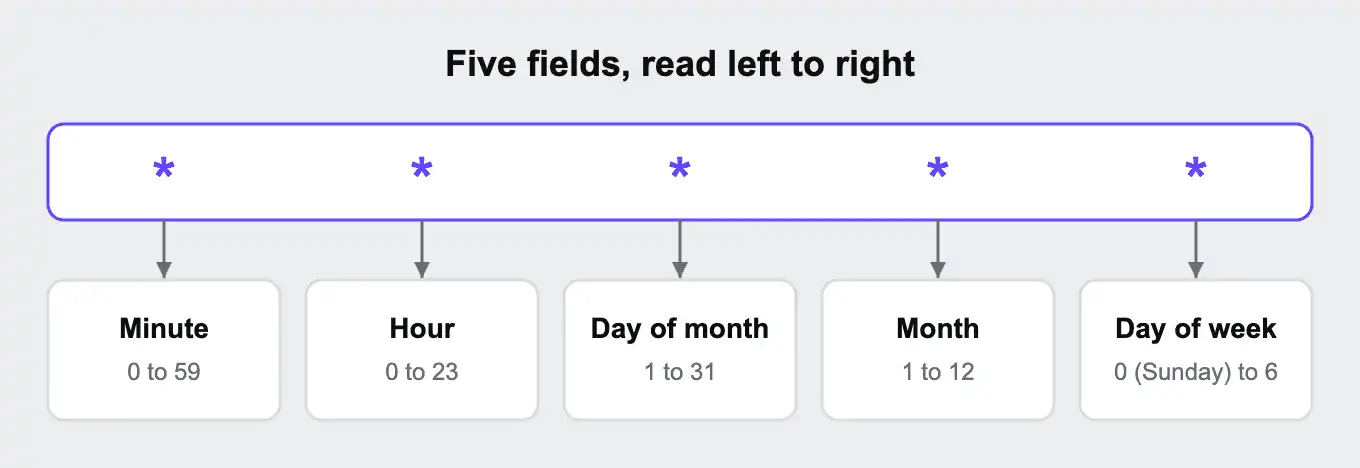
Hours use the 24-hour clock, so 14 means 2 p.m. Many versions of cron also accept 7 for Sunday, and three-letter names such as JAN or MON in place of numbers.
Four special characters do most of the work:
| Character | Meaning | Example | Example means |
|---|---|---|---|
* | Every value | * * * * * | Every minute |
, | A list of values | 0 9,17 * * * | At 9:00 and 17:00 |
- | A range of values | 0 9 * * 1-5 | At 9:00, Monday to Friday |
/ | Every nth value | */15 * * * * | Every 15 minutes |
They can be combined. 0 9-17/2 * * 1-5 means on the hour, every two hours from 9:00 to 17:00, on weekdays.
Many cron programs also understand shortcuts for common schedules:
| Shortcut | Same as | Runs |
|---|---|---|
@hourly | 0 * * * * | At the start of every hour |
@daily | 0 0 * * * | At midnight every day |
@weekly | 0 0 * * 0 | At midnight every Sunday |
@monthly | 0 0 1 * * | At midnight on the 1st of every month |
@yearly | 0 0 1 1 * | At midnight on January 1 |
@reboot | No equivalent | Once, when the server starts |
Not every tool supports these shortcuts, so check before you rely on one. You may also see characters such as ?, L, W, and # in some tools' documentation. They come from extended formats used by specific schedulers and don't work in standard cron.
Cron expression cheat sheet
Key takeaway: most schedules you'll need are a small variation on one of these. Times are in the server's time zone.
| Schedule | Cron expression |
|---|---|
| Every minute | * * * * * |
| Every 5 minutes | */5 * * * * |
| Every 15 minutes | */15 * * * * |
| Every 30 minutes | */30 * * * * |
| Every hour, on the hour | 0 * * * * |
| Every 2 hours | 0 */2 * * * |
| Every 6 hours | 0 */6 * * * |
| Every day at midnight | 0 0 * * * |
| Every day at 2:30 a.m. | 30 2 * * * |
| Twice a day, at 9:00 and 17:00 | 0 9,17 * * * |
| Weekdays at 9:00 | 0 9 * * 1-5 |
| Every hour from 9:00 to 17:00 on weekdays | 0 9-17 * * 1-5 |
| Every Monday at 8:00 | 0 8 * * 1 |
| Every Friday at 22:00 | 0 22 * * 5 |
| Every Sunday at midnight | 0 0 * * 0 |
| First day of every month at midnight | 0 0 1 * * |
| 15th of every month at midnight | 0 0 15 * * |
| Every three months (January, April, July, October) | 0 0 1 */3 * |
| Once a year, January 1 at midnight | 0 0 1 1 * |
Some platforms set a minimum interval. On Upsun Cloud, for example, jobs can run no more often than every 5 minutes.
If you're unsure what an expression does, paste it into an online cron expression checker before you rely on it. Most show the next few times it will run, which is the quickest way to catch a mistake.
Common cron mistakes and how to avoid them
Key takeaway: most cron problems come from assumptions about time, environment, or output. Cron runs exactly what you wrote, in a more limited setting than your terminal, and usually tells nobody when it fails.
Forgetting the time zone
Cron uses the server's time zone, and many servers run on UTC. A job meant for 9:00 in New York set as 0 9 * * * on a UTC server runs at 4:00 or 5:00 a.m. local time, depending on daylight saving. Check the server's time zone, or set one explicitly if your tool allows it.
Setting both day fields
When both the day-of-month field and the day-of-week field are restricted, cron runs the job when either one matches, not when both do. So 0 9 1-7 * 1 doesn't mean "the first Monday of the month". It runs at 9:00 on each of days 1 to 7 and on every Monday. To run on the first Monday only, schedule it for Mondays and have the command itself check the date.
Expecting even gaps from uneven steps
*/7 * * * * sounds like every 7 minutes, but the count restarts each hour. It runs at minute 0, 7, 14, and so on up to 56, then at 0 again, only 4 minutes later. Step values divide evenly only when they go into 60 (for minutes) or 24 (for hours), such as 5, 10, 15, 20, or 30.
Relying on your usual environment
Commands that work in your terminal can fail under cron, because cron starts them with a minimal set of environment variables and a short search path. Use full paths to programs and scripts, and set any variables the command needs inside the script itself. Our guide What are environment variables? covers how to supply them safely.
Letting failures go unnoticed
On many systems, cron either throws away a job's output or sends it to a local mailbox nobody reads. Redirect output to a log file, as in >> /var/log/job.log 2>&1, and for important jobs, use a monitoring tool that alerts you when a scheduled job doesn't check in.
Letting runs overlap
If a job takes longer than the gap between runs, cron starts the next copy anyway, and the copies can interfere with each other. On Linux, wrapping the command in flock prevents a second copy from starting while the first is still running:
*/5 * * * * flock -n /tmp/report.lock /usr/local/bin/report.shUsing % in a command
In a crontab line, a % character marks a line break, which breaks commands such as date +%F. Escape it as \%, or move the command into a script file.
When cron isn't the right tool
Key takeaway: cron is for short tasks that should happen at a set time. Work that runs continuously, takes a long time, or reacts to events belongs elsewhere.
Cron is simple and reliable for what it does, but teams often stretch it past that. Signs you've outgrown it include a job that runs every minute to check whether there's work to do, a job that regularly runs longer than its interval, or a job that has to be retried by hand when it fails.
| What you need | Better fit | Why |
|---|---|---|
| Process tasks as soon as they arrive, such as sending an email after sign-up | A background worker reading from a queue | Work starts within seconds instead of waiting for the next scheduled run |
| Run a heavy job without slowing down your app | A separate container or worker for that job | The job gets its own resources instead of competing with the web app |
| Run steps in order, with retries and alerts when one fails | A workflow or job scheduler | Dependencies, retries, and history are built in |
| Run a short task at a fixed time | Cron | It's the simplest tool for the job |
A common pattern combines them: a cron job runs on a schedule, adds work to a queue, and a background worker does the heavy lifting. The cron job stays quick and the work happens outside it.
Our post When your job is too tough for cron covers the case for workers, and the Dev Center post That cron should be a worker walks through moving a job over.
By language and framework
Key takeaway: many frameworks have their own scheduler, and each one still needs something to keep it running: a cron job, a long-running worker, or the app itself.
You rarely write raw cron lines for every task in a modern app. Instead, you define schedules in your code and let the framework decide what's due. Each framework handles the trigger differently:
| Framework | Built-in scheduler | How it runs | What to watch |
|---|---|---|---|
| Laravel | Task scheduler, defined in code | A single cron job runs php artisan schedule:run every minute, and Laravel works out which tasks are due | It expects a run every minute. Where that isn't allowed, php artisan schedule:work in a long-running worker keeps the same rhythm |
| Symfony | Scheduler component (Symfony 6.3 and later) | A Messenger worker runs messenger:consume scheduler_default and fires each recurring task when it's due | Needs a worker that's always running. Two workers on the same schedule need a lock so tasks don't run twice |
| Django | None built in | Management commands called from cron, or Celery beat for apps already using Celery | Only one Celery beat process should run, or tasks are sent twice |
| Rails | Recurring tasks in Solid Queue, Rails' default job backend since Rails 8. The whenever gem is an older alternative that writes cron entries | Solid Queue runs them from its own scheduler process | Check which approach the app already uses before adding the other |
| Node.js | None built in. Libraries such as node-cron add one | The schedule runs inside the app process | Every running copy of the app runs the schedule, so an app scaled out to three copies runs each job three times |
Any scheduler that lives inside the web app runs once per copy of that app, so move it to a single worker, or to the platform's cron, before scaling out.
On Upsun Cloud, Laravel's every-minute expectation meets the 5-minute cron minimum. The Upsun docs cover two options: run schedule:run from a cron job, accepting the 5-minute rhythm, or add a worker whose start command runs the scheduler every minute. Note that web and worker containers share files only through storage mounts, as the Upsun docs on workers explain; tmp and instance mounts are separate for each container. The Laravel cron guide in the Upsun docs shows both setups. The worker approach also suits Symfony's Scheduler and Celery beat. For runtime setup, see the Upsun docs for PHP, Node.js, Python, and Ruby.
Cron jobs on Upsun Cloud
Key takeaway: on Upsun Cloud, cron jobs are defined in .upsun/config.yaml alongside the app, use standard cron expressions, and run inside the app's own container.
On Upsun Cloud, you don't edit a crontab on a server. Each app's cron jobs are listed under a crons key in the project's .upsun/config.yaml file, so they're version-controlled and deployed with the code:
applications:
  myapp:
    type: "nodejs:24"
    crons:
      hourly-sync:
        spec: "H * * * *"
        commands:
          start: "node scripts/sync.js"
      nightly-cleanup:
        spec: "30 2 * * *"
        commands:
          start: "node scripts/cleanup.js"
        shutdown_timeout: 30
Each job has a name, a spec with the cron expression, and a start command. Optional settings include a stop command for shutting down cleanly, a shutdown_timeout (10 seconds by default) before an interrupted job is forced to stop, and a timeout that caps how long a job can run (24 hours by default). New to the file format? Our guide What is a YAML file? explains it.
Cron on Upsun Cloud behaves differently from cron on your own server in these ways:
| Behavior | What it means |
|---|---|
| H in the schedule | H * * * * means once an hour at a fixed but unspecified minute, so scheduled jobs don't all try to start at the same moment |
| A 5-minute minimum | Jobs can't be scheduled to run more often than every 5 minutes |
| A random start offset | Each run starts after a random delay of up to 20 minutes or the job's interval, whichever is shorter, to spread the load |
| One job at a time | Each app container runs one cron job at a time. If another is due, it waits until the first finishes |
| Time zone | Jobs run in the app's runtime or container time zone unless you set the timezone property |
| Paused crons | On preview environments, and production environments with no domain yet, crons pause after 14 days without a deployment and restart with the next push or redeploy |
A running cron job and a deployment can't happen at the same time, so a long job can delay a deploy. Setting a sensible shutdown_timeout keeps that delay short. And if a job is heavy enough to slow down the site, move it to a worker, or have the cron start it in a separate task container, as shown in the Dev Center tutorial Offload heavy jobs to Upsun task containers with cron.
The Console's Crons tab shows each job's run history, including failures and unusually long runs. For every option, see crons in the Upsun docs.
Frequently asked questions (FAQ)
What does * * * * * mean in cron?
Five asterisks mean every minute of every hour, every day. It's the most frequent schedule standard cron allows.
How do I run a cron job every 5 minutes?
Use */5 * * * *. The */5 in the minute field means every fifth minute: 0, 5, 10, and so on.
What time zone does cron use?
The server's time zone, which is often UTC. Check it before scheduling anything for a specific local time, and remember that daylight saving changes can shift jobs by an hour.
What is the difference between cron and crontab?
Cron is the program that runs scheduled jobs. A crontab is the file that lists them. crontab is also the name of the command used to edit that file.
Can a cron job run every second?
Not in standard cron, where the smallest unit is one minute. For work that needs to happen more often, use a long-running background worker instead.
How do I see whether a cron job ran?
Standard cron doesn't keep a history for you. Redirect the job's output to a log file, and check the system log, where many Linux systems record each run. Hosting platforms often show run history too. Upsun Cloud shows it in the Console's Crons tab.
Sources
- crontab(5) manual page, Linux man-pages project
- Crons, Upsun docs
- Monitor cron job executions, Upsun docs
- That cron should be a worker, Upsun Developer Center
Deploy possibility.
Try Upsun for free.
Stay updated
Upsun Cloud: compliant and validated