


TL;DR
|
A read replica is an extra copy of a database that only answers read queries. The main database, called the primary, handles every change, then copies each change to its replicas. Your app sends reads, such as loading a page or running a report, to the replicas, so the primary has more room for everything else.
Read replicas are one of the more direct ways to scale a database, because many apps read far more than they write. This guide explains how replicas work, what replication lag means for your app, and when replicas help and when they don't.
How read replicas work
Key takeaway: writes go to one primary, which copies every change to its replicas. Reads can go to any replica.

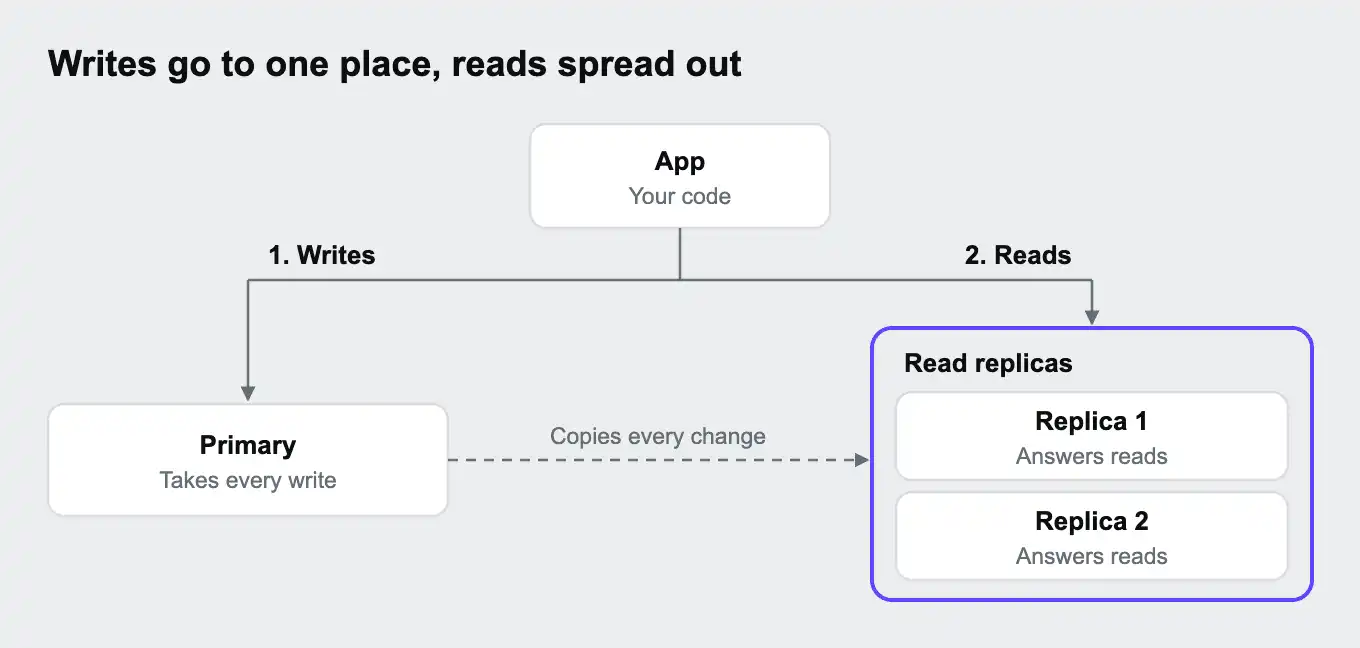
- The app sends every write, such as a new order or an edited profile, to the primary database.
- The primary saves the change and sends it to each replica, a process called replication.
- Each replica applies the change to its own copy of the data.
- The app sends read queries to the replicas, spreading them across however many replicas exist.
Adding a replica adds capacity for reads without making the primary any bigger. That matters because a database usually has one primary, and making it bigger has a limit. Our guide What is autoscaling? covers why databases are the hardest part of an app to scale.
Replication lag
Key takeaway: replicas are usually a moment behind the primary, so code must not assume a replica has a change the instant it's written.
Replicas commonly use asynchronous replication: the primary confirms a write before the replicas have it. The gap, usually milliseconds, is called replication lag. Under heavy load it can grow.
The classic problem is reading your own write. A user saves their profile, the next page loads it from a replica, and for a moment they see the old version. Common fixes:
| Approach | How it works |
|---|---|
| Read your own writes from the primary | After a user changes something, send their next few reads to the primary |
| Send critical reads to the primary | Checkouts, account balances, and anything that must be current always read from the primary |
| Accept a little staleness | Lists, search results, and reports are usually fine a moment out of date |
When read replicas help
Key takeaway: replicas help when reads dominate. They don't help when writes are the bottleneck.
| Situation | Do replicas help? | Why |
|---|---|---|
| Content sites with many page views | Yes | Almost every request is a read |
| Dashboards and reports | Yes | Heavy reads can run on a replica without slowing the main app |
| Analytics or exports run by background jobs | Yes | Long reads move off the primary |
| Heavy write traffic, such as logging every event | No | Every write still goes to the primary |
| Slow queries caused by a missing index | Not really | The query is still slow, just on a different server. Fix the index |
| Protection against losing data | No | A replica copies mistakes too. Deleting a table on the primary deletes it on the replicas. Use backups |
What your app needs to change
Key takeaway: your app has to know which database to send each query to.
Replicas don't help until the app sends reads to them. That usually means:
- Configuring two connections: one to the primary for writes and one for reads.
- Telling the framework or ORM which connection to use for reads. Several frameworks, including Django, Rails, and Laravel, support separate read and write database connections.
- Deciding which reads must stay on the primary because they can't tolerate lag.
Read replicas on Upsun Cloud
Key takeaway: on Upsun Cloud, PostgreSQL and MariaDB read replicas are services you define in your configuration, and they can scale automatically with demand.
According to the Upsun docs on PostgreSQL and MariaDB read-only replication, you define a replica as a service linked to the primary. Here's a PostgreSQL primary with one replica:
services:
  db:
    type: "postgresql:17"
    configuration:
      endpoints:
        replicator:
          replication: true
  db-replica1:
    type: "postgresql-replica:17"
    configuration:
      endpoints:
        postgresql:
          default_database: main
    relationships:
primary: "db:replicator"| What to know | Details from the Upsun docs |
|---|---|
| Service types | postgresql-replica and mariadb-replica |
| Connecting to the primary | The primary needs an endpoint named replicator, and the replica's relationship to it must be named primary |
| Reads | Your app sends read queries to the replica's connection, which it finds in the PLATFORM_RELATIONSHIPS variable |
| Writes | Replicas are read-only. Attempts to change data return an error |
| Lag | Replication is asynchronous, with delays of a few milliseconds |
| Autoscaling | Replicas can scale automatically based on CPU or memory use, configured in the Console or the CLI, with no redeployment needed |
| Scope | Replicas can't be shared with apps in other projects |
Because replicas can autoscale alongside apps and workers, the database layer can grow with traffic instead of becoming the bottleneck. Our guide What is autoscaling? explains how the settings work, and the posts Native, full-stack autoscaling on Upsun and PostgreSQL and MariaDB autoscaling: how full-stack autoscaling closes the database gap cover the launch in detail.
You can deploy on Upsun Cloud free for 15 days, with no card needed, or see how scaling and performance work on Upsun Cloud.
Frequently asked questions
What is the difference between a primary database and a read replica?
The primary accepts both reads and writes and is the source of truth. A read replica is a copy that only answers reads and receives every change from the primary.
Is a read replica a backup?
No. A replica copies every change, including mistakes and deletions, almost immediately. Backups keep earlier versions you can restore.
What is replication lag?
The delay between a change being saved on the primary and appearing on a replica. It's usually milliseconds, but it can grow under heavy load.
How many read replicas do I need?
Start with one and watch the primary's load and the replica's CPU and memory. Add more, or let autoscaling add them, if reads keep growing.
Can I write to a read replica?
No. Replicas are read-only, and write attempts return an error. All changes go to the primary.
Do read replicas help with slow queries?
Only if the primary is overloaded. A slow query caused by a missing index or a poor query plan is just as slow on a replica.
Deploy possibility.
Try Upsun for free.
Stay updated
Upsun Cloud: compliant and validated