


What every agent run costs: a walkthrough for engineering leaders
AI agents can review pull requests, identify bugs, and suggest fixes in minutes. But finding issues is only one part of the picture. As your team opens more pull requests across repositories, you also need to know what each run costs, what drives those costs, and how much you are spending overall.
With Upsun Dispatch™, you can answer that for every run. There are two costs to keep track of:
- Agent time is what Upsun charges: $1.45 an hour, billed by the second with a one-cent minimum per run, and paid from your Upsun Dispatch credit.
- Model tokens are what your AI provider charges. You bring your own Anthropic or OpenAI key, and Upsun adds no markup.
Dispatch tracks both against each run, but only agent time comes out of your Dispatch credit.
In this walkthrough, we used a sample repository to follow those costs from start to finish. We will add credit, watch a code review run, look at its results, and explore the Usage dashboard to see which runs are costing more and why.
Step 1: top up your Upsun Dispatch credit
Before we start running code reviews, we ran this walkthrough on a paid plan so we could show the balance moving, so the first step is adding credit. Your first Dispatch organization starts on the free plan, which includes 20 agent-minutes per day, shared across your team.
There's no trial deadline, so you can continue using the free allowance for as long as you need. If your team needs more agent time, you can upgrade to a paid plan and add credit.
Upgrading connects your organization to a billing profile, but nothing is charged at that point. Billing has three layers:
- A billing account records who is paying, such as an individual or a company.
- A billing profile sits inside the account. It sets your currency (USD, EUR, GBP, CAD or AUD) and holds your credit balance.
- Your organizations draw on that balance.
To add credit, select Top up and choose $25, $50, $100 or $200. Your balance updates once the payment clears. Credit is valid for 12 months from purchase.

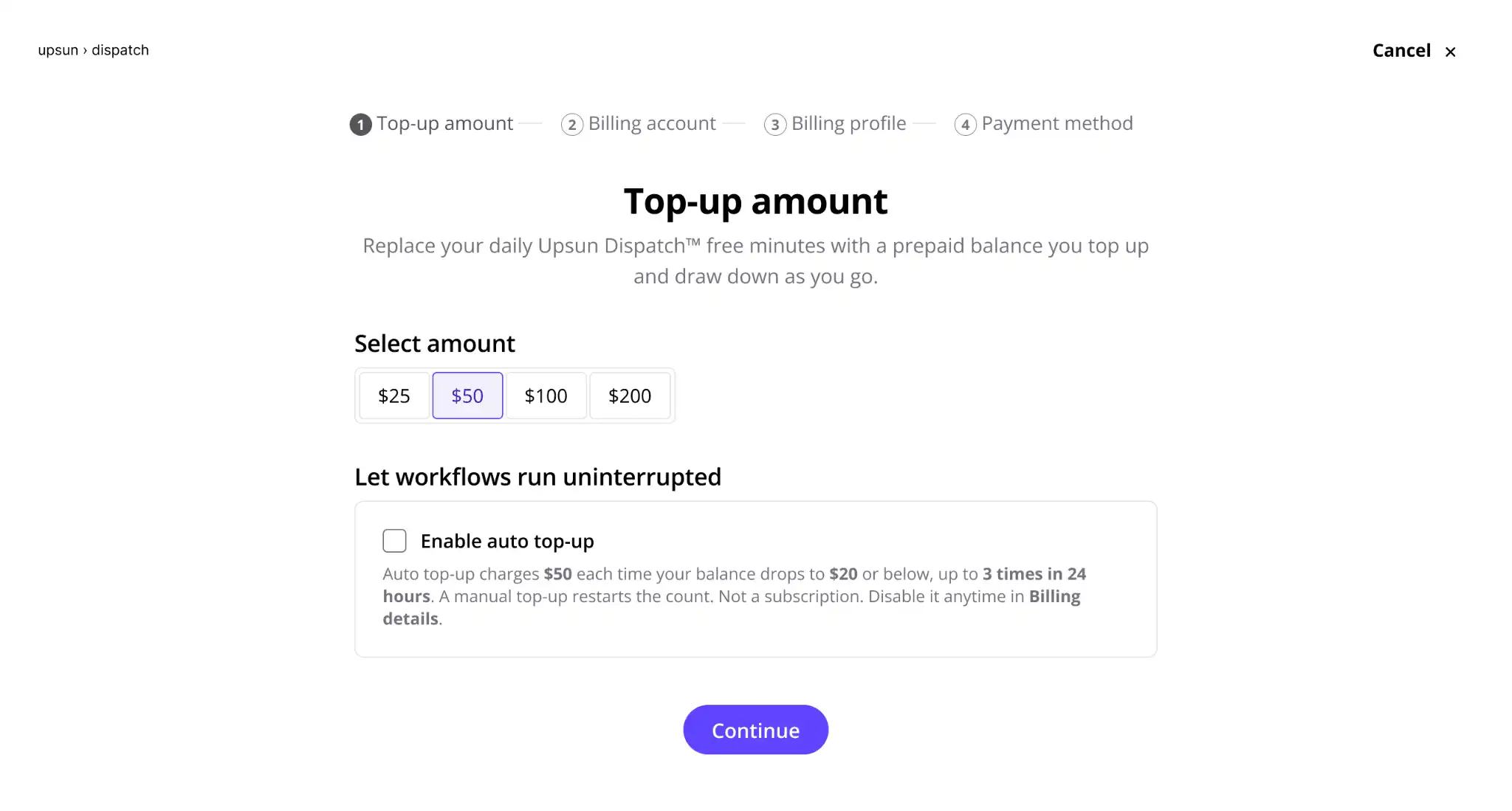
Note: Upgrading is permanent and terminates any remaining free daily minutes.
Step 2: open a pull request
With credit added, let's see what happens when Dispatch reviews a pull request.
For this walkthrough, we used a sample repository and opened pull request #8, a small, one-file change to fix how reading time is calculated on blog posts.
Because the repository was already connected to Dispatch, opening the pull request automatically triggered a code review. We didn't need to start the workflow manually.
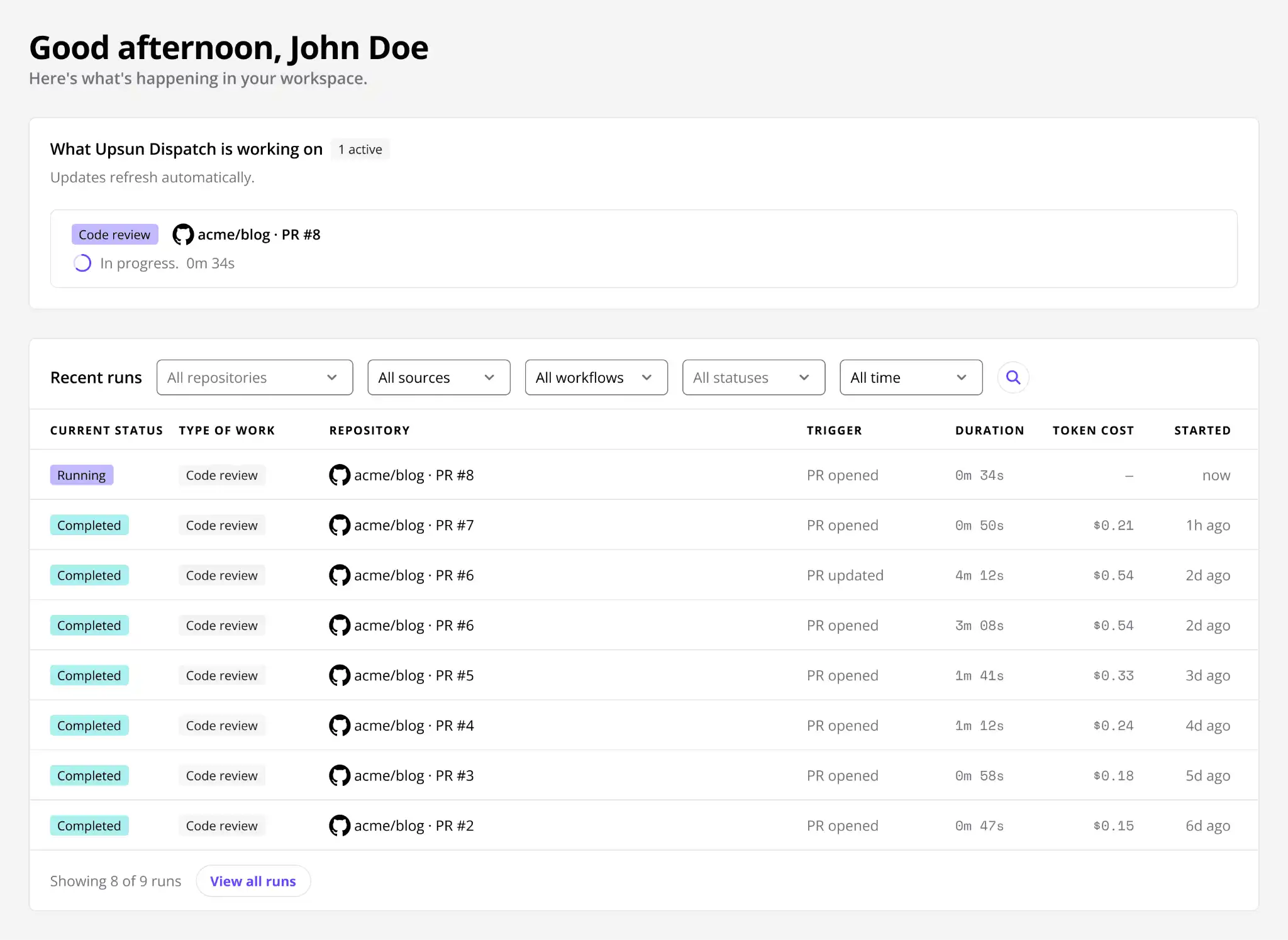
The review appeared on the Dispatch dashboard and the Runs page, where we could track its progress. Each run shows its status, the repository and pull request it belongs to, what triggered it, how long it took, and its estimated token cost.

Step 3: watch the cost build
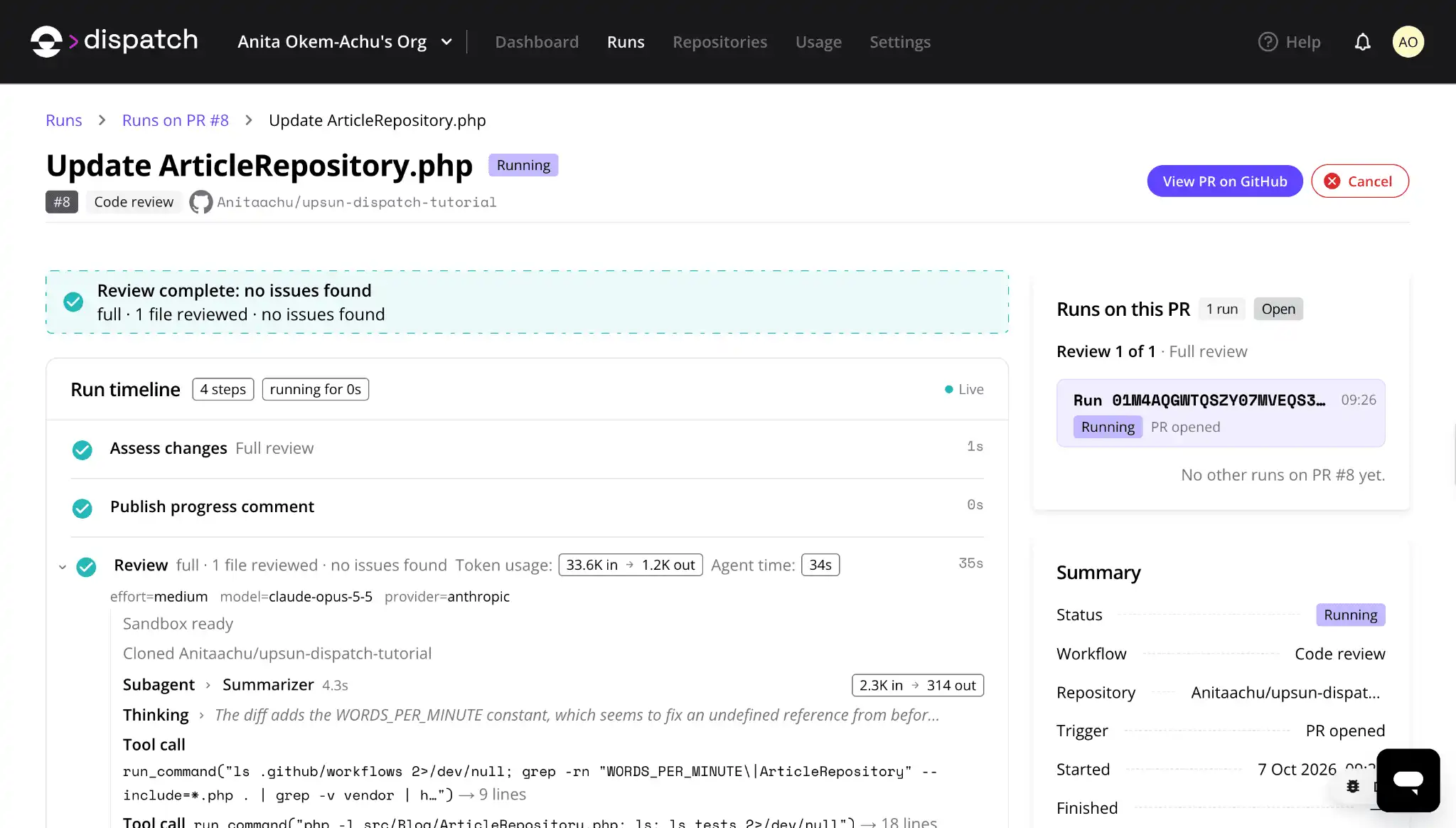
Let's open pull request #8 while the review is still running. On the run details page, a Live indicator shows that the page is updating as the agent works. The timeline breaks down each step and shows its agent time and token usage as soon as it finishes.
For our pull request, the review step recorded:
- Token usage: 33.6K tokens in and 1.2K out, billed by your model provider
- Agent time: 34 seconds, billed by Upsun from your credit
- Model:
claude-opus-5-5from Anthropic, at medium effort

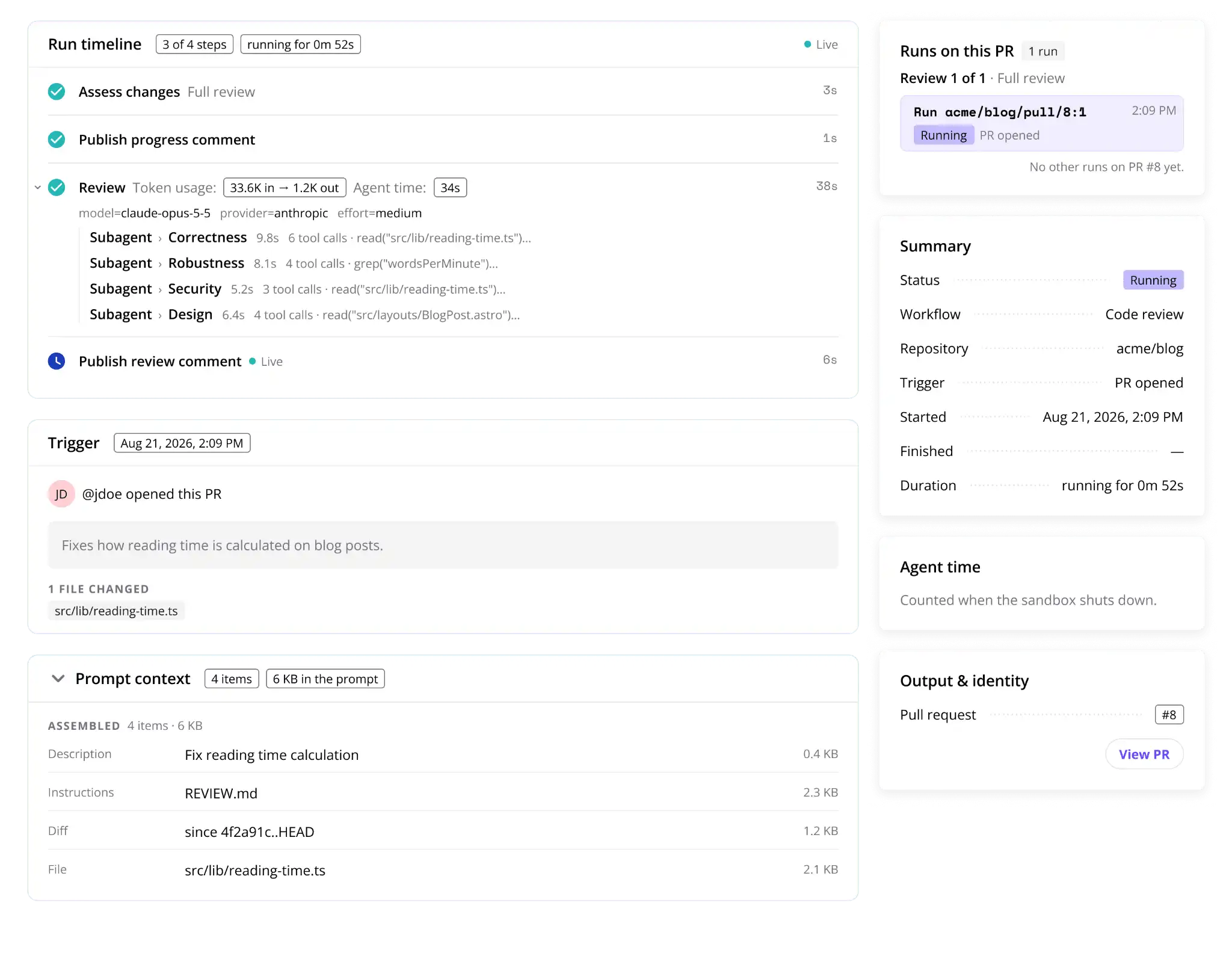
These figures appeared as soon as the review step finished, while the run was still in progress. We could see how much agent time and model usage the review had consumed without waiting for the run to end.
The timeline also shows the commands the agent executes, making it possible to follow what it's doing throughout the review. If a run was triggered by mistake or needs to be stopped, you can select Cancel directly from the run details page.
Step 4: read the finished run
Once a run finishes, Upsun Dispatch keeps a record of what happened, including the steps completed, model used, token consumption, agent time, and review findings. You can return to these details at any point.
This matters most when a review finds something. Earlier, pull request #7 in the same repository changed how reading time was rounded. Upsun Dispatch reviewed it in 50 seconds and found two problems:
- Warning: the pull request's own change added a minute to some reading times.
- Critical: a missing constant made every blog page crash. The bug was traced to an earlier commit.
Each finding pointed to the exact line and explained the fix. The whole review used 43 seconds of agent time.

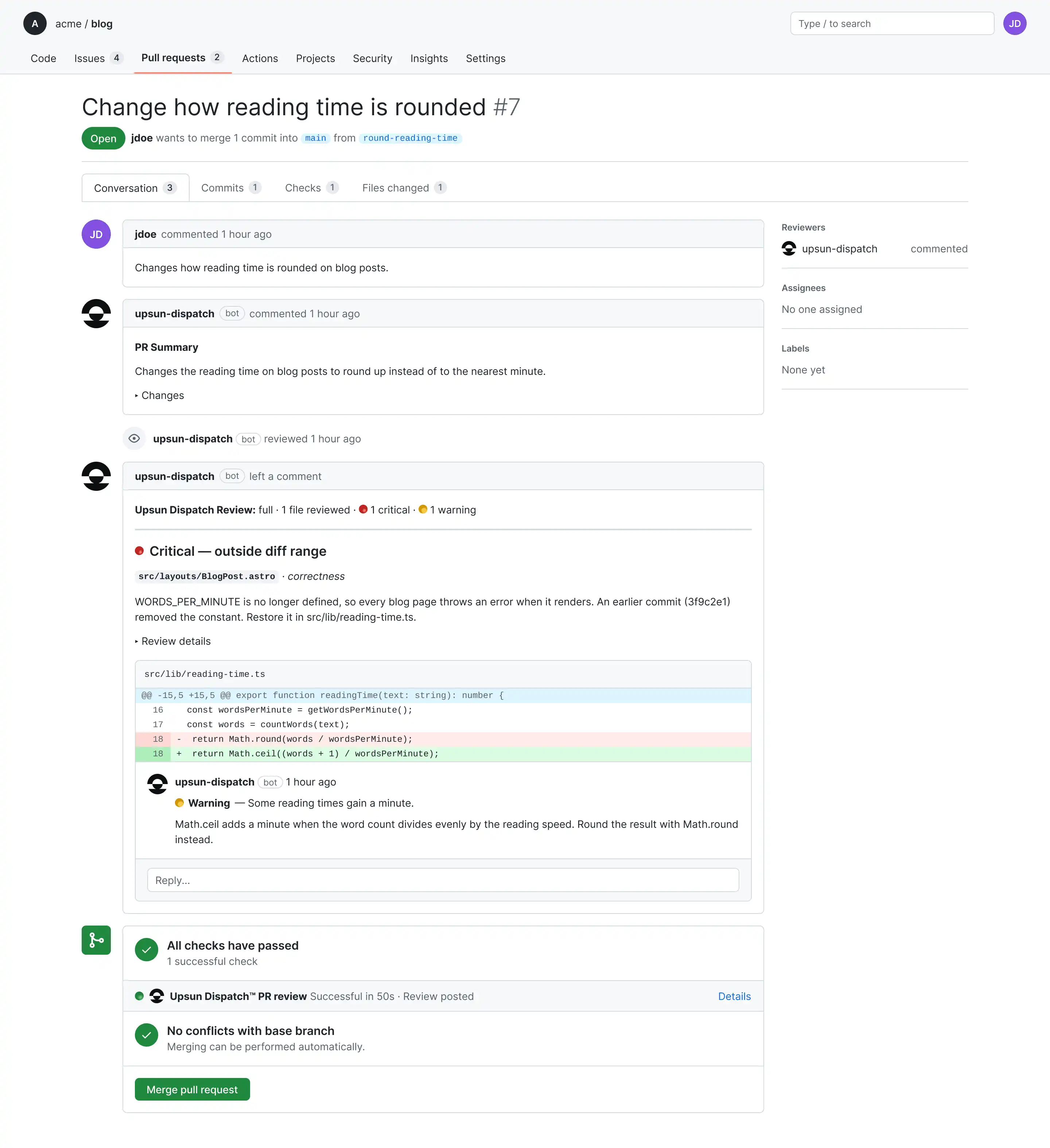
Cost and outcome sit in one record, so it is easy to judge whether a review was worth it.
Step 5: pause for a human decision
Our code review sailed straight through. But some work shouldn't. Sometimes you want a person to say yes before the agent goes any further.
That's what gates are for. A gate pauses a run until someone approves it, rejects it, or sends it back with feedback. Gates live in the workflow definition. Code review ships without one.
Currently, Dispatch supports plan approval for Issue to code workflows triggered from Jira. You can enable this under Settings > Workflows. Once enabled, the agent posts its proposed plan in Jira and waits for approval. Your approver replies in Jira with @upsun-dispatch plan approve, reject or revise.
The important part for billing is that you are not charged while the agent is waiting. Agent time only counts while a sandbox is running, so a run can stay paused for approval without using your credit.
If no decision is made within seven days, the gate expires, and you’ll need to start the request again, which uses more agent time and tokens.
For more on how gates work, see Runs, gates, and workflows: the primitives, explained
See how much your code review cost
Now that the review is complete, let's head back to the Billing page to see how it affected our Dispatch credit.
Before the run, our balance was $50. After the review finished, it dropped to $49.98. That difference covers the agent time used during the run.
Remember, Dispatch only deducts credit for agent time, meaning how long the run’s sandboxes were up. Model tokens are billed separately by your AI provider, so the estimated token cost shown on the Runs page won't be deducted from your Dispatch balance.
Most code reviews cost pennies in agent time. In Upsun's published example, a typical two-minute review uses about $0.06.
Upsun Dispatch notifies you before your balance runs out. You can top up by hand or let automatic top-ups refill your credit.
Track usage across your organization
Checking the cost of one review is useful, but what happens when your team is running multiple workflows across different repositories?
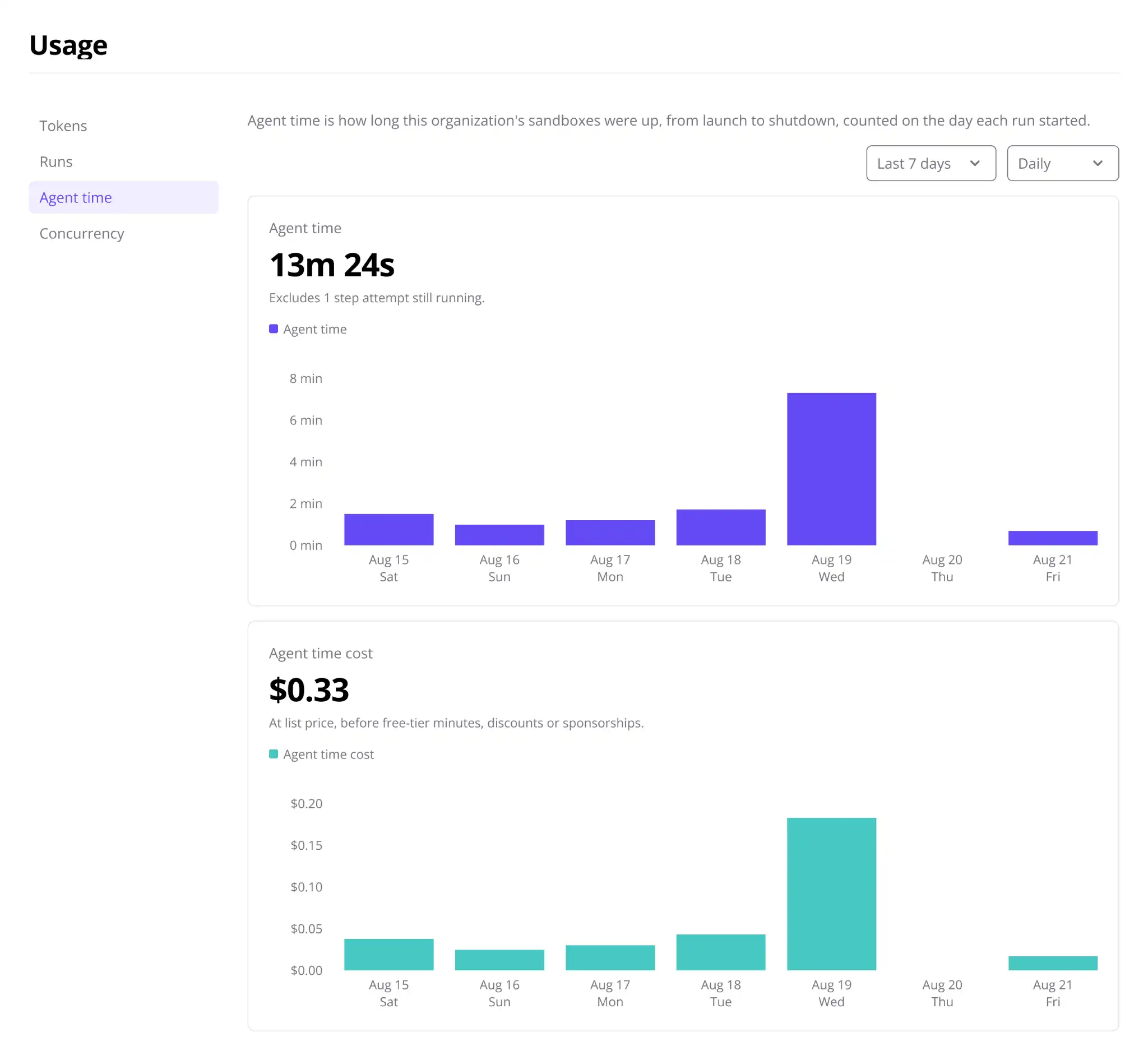
The Usage page covers every run in your organization, including retries. It has four tabs: Tokens, Runs, Agent time, and Concurrency. You can group the charts by model or by workflow.
Two of those tabs answer almost every cost question you'll get:
- Agent time: shows how much agent time your workflows have consumed, which is what you pay for through your Dispatch credit.
- Tokens: shows input and output token usage, model calls, and estimated token costs.
Token costs are estimates calculated in US dollars using your AI provider's published pricing. Your provider bills you separately, so these figures may differ from your actual invoice.
To track spend per team, give each team its own Dispatch organization. Each organization has a separate Usage page, while all of them can draw credit from the same billing profile.

Which run is costing the most?
In our sample repository, most runs cost between $0.15 and $0.33 in estimated tokens. Two cost $0.54. On the Runs page, the token cost column makes those two easy to spot. They were also the longest runs, at just over three and four minutes.
The daily Usage chart shows a matching spike in August.
Open the expensive run to see why. Its timeline shows how long each step took and how many tool calls the agent made.
A costly run isn't always a problem, since bigger changes take more reading. What matters is that you can see the reason, not just the number.
Investigate your most expensive runs
Not every run costs the same. A small code review might finish in under a minute, while a more complex task can take longer and use more tokens.
Let's look at the runs in our sample repository.
Most had estimated token costs between $0.12 and $0.33, but two stood out at $0.54 each. These were also the longest runs, taking just over three and four minutes to complete.
You can identify these runs on the Runs page by checking the token cost column. The daily chart on the Usage page also shows a spike in August, making it easier to spot when usage increased.
To investigate, open one of the higher-cost runs. The timeline breaks down each step, showing how long it took and how many tool calls the agent made. You can use this information to understand what happened during the run and where the additional usage came from.

A higher token cost doesn't necessarily mean something went wrong. More complex changes can require additional analysis and model calls. The important thing is being able to investigate the run rather than relying on the cost figure alone.
What happens when your credit runs out?
If your credit runs out, Upsun Dispatch doesn’t stop work halfway:
- New runs wait until you top up.
- Runs already in progress will finish their work.
So your balance can dip slightly below zero. This overrun will show up on the Usage page like any other cost, and your next top-up settles it.
Try Upsun Dispatch for free today
You can try all of this without a card. Your first Upsun Dispatch organization starts on the free plan, which includes:
- 20 agent-minutes a day, shared across your team.
- No credit card and no trial countdown.
- Your own model key, so tokens stay on your provider bill.
When the free minutes run out, running work finishes and new runs wait until midnight UTC.
The next time someone asks "what did that cost?" you'll have the answer before they finish the sentence.
Deploy possibility.
Try Upsun for free.
Stay updated
Upsun Cloud: compliant and validated