


TL;DR
|
A .env file is a simple list of settings, one NAME=value per line. Docker Compose can read one in two different ways: to fill in values inside your compose.yaml file, and to pass variables into your containers so your app can use them.
Those two jobs work differently, and Compose only does the first one automatically. This guide explains both, with examples, and covers the mistakes that leave apps unable to see their variables. For a refresher on the files themselves, see our guide What is .env?
Two different jobs
Key takeaway: the .env file next to your compose file fills in the compose file. Your app only sees variables you pass with env_file or environment.

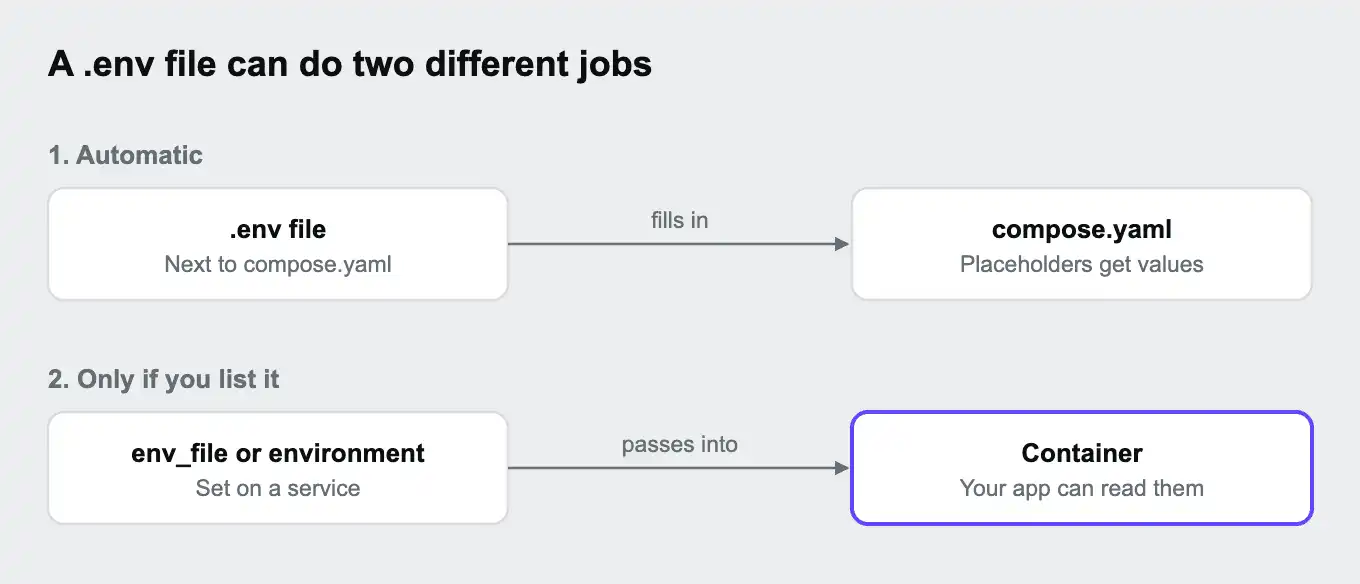
| Filling in the compose file | Passing variables to your app | |
|---|---|---|
| How it's set up | A file named .env next to your compose file. Compose reads it automatically | An env_file: or environment: entry on a service |
| What it affects | ${VARIABLE} placeholders in compose.yaml, such as image versions and port numbers | The environment variables your app can read inside the container |
| Reaches your app? | Only if the compose file passes the value on | Yes |
Docker calls the first job interpolation: replacing placeholders in the compose file with real values before anything starts.
Filling in values in the compose file
Key takeaway: placeholders like ${POSTGRES_VERSION} are filled in from your shell or the .env file when Compose reads the file.
With this .env file next to your compose file:
POSTGRES_VERSION=17
WEB_PORT=8080
You can use its values in compose.yaml:
services:
  db:
    image: postgres:${POSTGRES_VERSION}
  web:
    build: .
    ports:
      - "${WEB_PORT}:8000"
Compose replaces the placeholders before starting anything, so the database uses PostgreSQL 17 and the app is reachable on port 8080. If the same variable is also set in your terminal session, the terminal's value wins.
Two useful patterns:
| Syntax | What it does |
|---|---|
${WEB_PORT:-8080} | Uses 8080 if WEB_PORT isn't set |
${API_KEY:?API_KEY must be set} | Stops with an error message if API_KEY isn't set |
To use a different file for this job, pass it on the command line, for example docker compose --env-file .env.staging up.
Passing variables to your app
Key takeaway: list a file under env_file to load all its variables into a container, or set individual variables under environment.
To make variables available to your app, add them to the service:
services:
  web:
    build: .
    env_file:
      - .env
    environment:
      APP_ENV: development
DATABASE_URL: postgres://app:${DB_PASSWORD}@db:5432/app| Option | What it does | Good for |
|---|---|---|
env_file: | Loads every variable in the listed files into the container | Passing a whole set of settings at once |
environment: | Sets specific variables, and can use ${...} placeholders filled in from .env or your shell | A few variables, or values built from others |
The paths in env_file: are relative to the compose file. Your app then reads the variables as usual, for example with process.env.APP_ENV in Node.js or os.environ.get("APP_ENV") in Python. Our guide What are environment variables? covers reading them in other languages.
Which value wins
Key takeaway: when the same variable comes from several places, the more specific setting wins.
For variables inside the container, Docker's documentation gives this order, from highest to lowest:
docker compose run -e NAME=valueon the command line- The
environment:attribute in the compose file - The
env_file:attribute in the compose file ENVinstructions in the image's Dockerfile
When filling in ${...} placeholders, a variable set in your terminal session wins over the same variable in .env.
Common mistakes and how to fix them
Key takeaway: if your app can't see a variable, check whether you passed it to the container, not just defined it in .env.
| Problem | Cause | Fix |
|---|---|---|
| The app can't see a variable that's in .env | The .env file only fills in the compose file. It isn't passed to containers automatically | Add env_file: - .env to the service, or set the variable under environment: |
| A change to .env has no effect | The running container was created with the old values | Run docker compose up -d again to recreate it. A plain restart keeps the old environment |
| The wrong value is used | The same variable is set in your terminal session, or under environment: | Check with docker compose config, and remove the duplicate |
| "variable is not set" warnings | A ${...} placeholder has no value | Add it to .env, or give it a default with ${NAME:-default} |
| A value with a $ in it breaks | Compose treats $ as the start of a placeholder | Write $$ for a literal dollar sign in the compose file |
| Secrets in Git | The .env file was committed | Add .env to .gitignore, commit a .env.example with dummy values instead, and change any exposed secrets. Our guides What is a .gitignore file? and What is an API key? cover this |
docker compose config prints your compose file with every value filled in, which makes it the fastest way to debug. It also prints any secrets, so don't paste its output into chats, tickets, or AI tools.
Keeping secrets safe with Compose
Key takeaway: a .env file is fine for local development. Keep it out of Git, and use test values rather than production secrets.
- Commit a
.env.examplefile listing every variable with placeholder values, so teammates know what to set. - Keep the real .env out of Git.
- Use test keys and local passwords in your .env, never production secrets.
- For sensitive values, Compose also supports a
secrets:section, which mounts each secret as a file inside the container rather than an environment variable.
Docker Compose and Upsun Cloud
Key takeaway: Upsun Cloud doesn't read .env files. Use Compose for local development, and set each environment's values as variables on the platform.
Docker Compose runs services on your own computer. On Upsun Cloud, your app's services are defined in .upsun/config.yaml, and its variables are set on the platform instead of in files:
| Local, with Docker Compose | On Upsun Cloud | |
|---|---|---|
| Where values live | A .env file on your computer | Project and environment variables, set in the Console or with the CLI |
| Secrets | A .env file kept out of Git | Sensitive variables, hidden in the Console and command line output, but readable by your app |
| Different values per environment | Different .env files, such as .env.staging | Environment-level variables. Preview environments inherit their parent's values unless you override them |
| Database connection details | Set by you in .env or environment: | Provided by the platform automatically |
Upsun Cloud apps don't read .env files at all, so values you rely on locally need setting on the platform too, using the env: prefix to make them available as ordinary environment variables:
upsun variable:create --level environment --name env:API_KEY --value "your-key" --sensitive trueThe Upsun docs describe local development options that let you keep an existing setup, such as Docker Compose, for working on your computer. Keep the service versions in your compose file matching .upsun/config.yaml, for example PostgreSQL 17 in both. One naming note: Upsun Cloud also supports a committed file called .environment for setting runtime variables in the app container. It isn't a .env file, so never put secrets in it.
You can deploy on Upsun Cloud free for 15 days, with no card needed, or see how security and compliance work on Upsun Cloud.
Frequently asked questions
Does Docker Compose read .env files automatically?
Yes, a file named .env next to your compose file, but only to fill in ${...} placeholders in the compose file. To pass its variables to your app, list it under env_file:.
What is the difference between .env and env_file in Docker Compose?
The .env file fills in values in the compose file. env_file: loads a file's variables into a container, where your app can read them.
Why can't my container see my .env variables?
Because the .env file isn't passed to containers on its own. Add env_file: - .env to the service, or set the variables under environment:, then recreate the container.
How do I use a different .env file with Docker Compose?
Use docker compose --env-file .env.staging up for filling in the compose file, or list the file under env_file: to pass it to containers.
Should I commit my .env file?
No. Commit a .env.example with placeholder values, and keep the real .env out of Git.
Do I need to restart containers after changing .env?
You need to recreate them. Run docker compose up -d again, because a plain restart keeps the old values.
Deploy possibility.
Try Upsun for free.
Stay updated
Upsun Cloud: compliant and validated