


502 Bad Gateway: what it means and how to fix it
TL;DR
|
A 502 Bad Gateway error means a server that sits between the visitor and your app couldn't get a valid response from the app. It asked for a page and got back an error, a broken answer, or no answer at all.
If you're looking at a 502 right now, this guide explains what it means, the usual causes, and what to check first. It also covers the two errors it's often confused with, 503 and 504. For the full list of codes, see our guide What are HTTP status codes?
What a 502 Bad Gateway error means
Key takeaway: a 502 comes from the server in front of your app. It means that server couldn't get a proper answer from the app behind it.

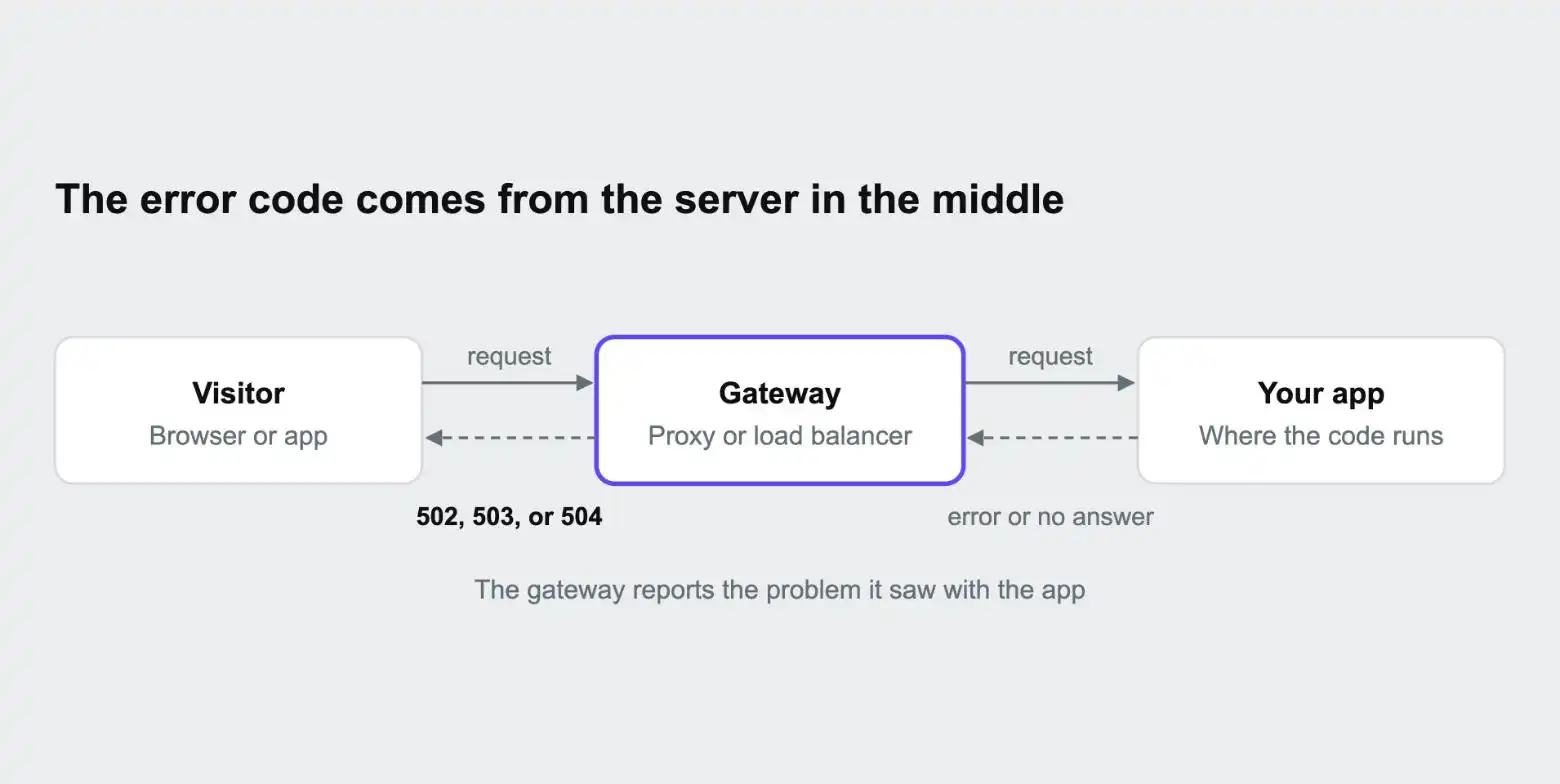
When someone visits a website, their browser rarely talks to the app directly. The request first reaches a gateway: a server that receives traffic and passes it on. That might be a content delivery network (CDN), a load balancer, or a web server such as Nginx. The gateway forwards the request to the app, and the answer travels back the same way. Our guide What is a reverse proxy? explains this setup.
The HTTP standard, RFC 9110, defines a 502 as a gateway receiving an invalid response from the server it forwarded the request to. In practice, "invalid" often means no usable response at all: the connection was refused, or dropped before an answer came back.
Real setups have several layers, and each can report its own error. A web server might log a 502 when the app behind it stalls, while a CDN in front shows visitors a different error for the same problem. Use the code to decide where to start, then let the logs tell you which layer actually failed.
Common causes of a 502 error
Key takeaway: a 502 usually means the app isn't running properly. It crashed, never started, or is listening somewhere the gateway isn't looking.
| Cause | What's happening |
|---|---|
| The app crashed or failed to start | A code error, a missing dependency, or a bad setting stopped the app, so nothing answers the gateway |
| The app is listening in the wrong place | The app is running, but on a different port or socket from the one the gateway sends requests to |
| The app ran out of memory | The system stopped the app's processes to free memory, and requests in progress were cut off |
| Every worker is busy | Apps handle a fixed number of requests at once. When all workers are tied up, often waiting on something slow, new requests fail |
| A deployment is in progress | The app is restarting and briefly unavailable |
| A domain or routing mistake | The gateway doesn't know which app should receive requests for this address |
How to fix a 502 Bad Gateway error
Key takeaway: check what changed, read the app's logs, and confirm the app is running where the gateway expects.
- Check whether anything changed recently. A 502 that started right after a deployment usually points to that deployment.
- Read the app's logs for crashes, error traces, or messages about memory. Restart messages repeating every few seconds mean the app is crashing on startup.
- Confirm the app is listening where the gateway expects. Many platforms tell the app which port to use through an environment variable, often called PORT. An app that ignores it and uses a fixed port is a classic cause of 502s.
- Check memory and worker usage. If the app keeps hitting its memory limit or running out of workers, it needs more resources, fewer workers per container, or faster responses.
- If the 502s come and go under load, look for slow requests tying up workers. Slow calls to outside services are a frequent culprit.
A few quick questions narrow it down. Is it every page, which points to the app or its setup, or some pages, which points to specific code? Is it constant, which suggests a crash or misconfiguration, or on and off, which suggests load, memory, or slow dependencies?
For PHP apps, the Dev Center post When php-fpm runs out of workers: a 502 error field guide walks through the busy-worker case in detail.
502 errors by language and framework
Key takeaway: the app server behind the gateway shapes how 502s show up. Each language has its own usual suspect.
| Language | Typical app server | Usual cause of 502s | What to check |
|---|---|---|---|
| PHP | PHP-FPM | Every PHP worker is busy, so new requests wait or fail. The log shows a message that the server reached max_children | The number of workers (pm.max_children), memory per worker, and slow requests holding workers up |
| Node.js | The app's own built-in server | The app crashed, or isn't listening on the port the platform assigned. A long task can also block Node's single event loop, so no request gets an answer | That the app reads its port from the PORT variable, crash messages in the app log, and slow code that blocks the event loop |
| Python | Gunicorn, often with Uvicorn workers | A request runs longer than Gunicorn's worker timeout (30 seconds by default), so the worker is killed mid-request and the log shows WORKER TIMEOUT | The worker count, the --timeout setting, and slow views or database queries |
| Ruby | Puma | All of Puma's workers and threads are busy, so requests queue until the gateway gives up | Puma's worker and thread counts, and slow requests |
Raising a timeout or adding workers can stop the errors for a while, but if requests are slow, the lasting fix is making them faster or moving long work into the background. Our guide Background jobs vs cron jobs explains the options.
Finding the cause of a 502 on Upsun Cloud
Key takeaway: on Upsun Cloud, the app and deploy logs explain many 502s, and the docs list the typical causes.
Upsun Cloud keeps separate logs for each part of the request chain, and the upsun log command reads them from your terminal. Run upsun log on its own to see which logs are available. All log times are in UTC by default.
| Log | Command | Look here for |
|---|---|---|
| App log | upsun log app | Crashes, error traces, startup failures, and memory warnings from your app |
| Deploy log | upsun log deploy | Failed migrations, database connection errors, and other problems during the last deployment |
| Access log | upsun log access | Requests that reached the app, with their status codes. Requests the router redirected or served from its cache aren't included |
| Error log | upsun log error | Web server errors once it's running |
| PHP access log | php.access.log on the container (PHP apps only) | Every request to PHP, which can include how long each one took, depending on settings |
The Upsun docs' 502 error resolution guide lists these as typical causes of 502s on Upsun Cloud:
- The app isn't listening on the port Upsun Cloud gives it. Apps must use the PORT environment variable instead of a fixed port. Run upsun ssh 'echo $PORT' to see the expected value.
- The app's start command (web.commands.start in .upsun/config.yaml) fails or exits right away.
- The app ran out of memory. In PHP apps, this shows in the app log as a process ending on signal 9 (SIGKILL). Give the app more memory with upsun resources:set, or, for PHP, reduce the number of workers.
- A PHP process crashed, shown as signal 11 (SIGSEGV), which usually points to a recent code change or a PHP extension.
- A new project was created but no code has been pushed yet, or a domain points to Upsun Cloud but hasn't been added to the project.
On Upsun Cloud, the number of PHP workers is set automatically from the container's memory. You can raise it with worker sizing hints or by giving the app more resources. For runtime-specific setup, see the Upsun docs for PHP, Node.js, Python, and Ruby.
502 vs 503 vs 504
Key takeaway: a 502 points to a broken app, a 503 to an app that's overloaded or switched off, and a 504 to an app that's too slow.
| 502 Bad Gateway | 503 Service Unavailable | 504 Gateway Timeout | |
|---|---|---|---|
| In plain terms | The app gave a broken answer, or none | The server can't take requests right now | The app took too long to answer |
| Is the app running? | Often not, or not where expected | Usually, but overloaded or paused | Usually, but slow |
| Typical causes | Crashes, wrong port, out of memory, busy workers | Maintenance, traffic spikes, failed health checks | Slow queries, slow outside services, long jobs |
| Does retrying help? | Sometimes, if the app is restarting | Often, once load drops or maintenance ends | Rarely, until the slow part is fixed |
| First place to look | App logs and recent deployments | Traffic, maintenance status, and health checks | Slow requests and response times |
503 Service Unavailable
Key takeaway: a 503 means the server is up but can't take requests right now, because it's overloaded or deliberately switched to maintenance.
The HTTP standard defines a 503 as a temporary condition, usually overload or scheduled maintenance. A server can include a Retry-After header saying when to try again. Unlike a 502, a 503 is sometimes sent on purpose: maintenance pages often use it, and some apps return one when a service they depend on is down.
| Common cause | What's happening |
|---|---|
| Planned maintenance | Someone switched the site into maintenance mode, often during a deployment or migration |
| Too much traffic | A traffic spike, a busy sale, or heavy bot traffic is more than the app can handle |
| No healthy servers | A load balancer checked each app server, and none passed |
| Limits reached | The app or platform has hit a limit on connections, workers, or requests |
| A dependency is down | The app deliberately returns a 503 because its database or another critical service isn't responding |
To fix it, rule out maintenance first, then look at traffic, health checks, and the app's dependencies. More capacity, caching, and autoscaling all help an app absorb spikes. If you take a site down for planned maintenance, a 503 is the right code: it tells visitors and search engines the outage is temporary.
504 Gateway Timeout
Key takeaway: a 504 means the app is probably running but too slow. The gateway stopped waiting before the answer arrived.
The HTTP standard defines a 504 as a gateway not receiving a timely response from the server behind it. Every gateway has a time limit, and when the app takes longer, the gateway gives up.
| Common cause | What's happening |
|---|---|
| Slow database queries | A query scans far more data than it needs to, often because an index is missing |
| Slow outside services | The app is waiting on a payment provider, an API, or another service |
| Long jobs inside a web request | A report, import, or export runs while the visitor waits |
| An overloaded database | Too many queries at once, or locked tables, make every request wait |
| Mismatched time limits | One layer, such as a CDN, gives up sooner than the app behind it is allowed to run |
To fix it, find the slow requests, speed up the slowest queries, set time limits on calls to outside services, and move long work into background jobs. Depending on the setup, slowness can also show up as a 502, if a web server runs out of free workers while requests wait. The Dev Center post Unstable website? Use queues. shows how moving slow work into background jobs fixes both.
On Upsun Cloud, the Console's HTTP metrics show error responses over time and the ten URLs with the most impact, and the Resources tab shows whether CPU or memory is near its limit, which helps with both 503s and 504s.
You can deploy on Upsun Cloud free for 15 days, with no card needed, or see how observability and profiling work on Upsun Cloud.
Frequently asked questions
What does 502 Bad Gateway mean?
That a server in front of a website, such as a web server or load balancer, couldn't get a valid response from the app behind it.
Is a 502 error my fault or the website's?
The website's. A 502 is a server-side error. As a visitor, the most you can do is refresh after a short wait, or try again later.
How do I fix a 502 Bad Gateway error?
Check what changed recently, read the app's logs for crashes or memory errors, confirm the app is listening on the right port, and check whether its workers or memory are maxed out.
What is the difference between a 500 and a 502 error?
A 500 Internal Server Error means the app itself hit an error while handling the request. A 502 means a gateway in front of the app couldn't get a valid response from it at all.
What is the difference between 502 and 504?
A 502 means the app gave a broken response, or none. A 504 means the app took too long and the gateway stopped waiting.
Do 502 errors hurt SEO?
Short outages generally don't cause lasting harm. Errors that persist for days can lead search engines to crawl the site less and eventually drop affected pages.
Deploy possibility.
Try Upsun for free.
Stay updated
Upsun Cloud: compliant and validated