


What is a preview environment?
TL;DR
|
A preview environment is a temporary copy of your app, created automatically for a single proposed change so people can try that change before it goes live. You may also see it called an ephemeral environment, a review app, or a pull request environment.
Instead of describing a change in a code review, a developer can share a link where reviewers click through the real thing. This guide covers how preview environments work and what makes one useful. For background on development, staging, and production themselves, see our guide Dev, staging, and production environments explained.
How a preview environment works
Key takeaway: a preview environment is created when a change is proposed, updated as the change evolves, and removed once the change is decided.

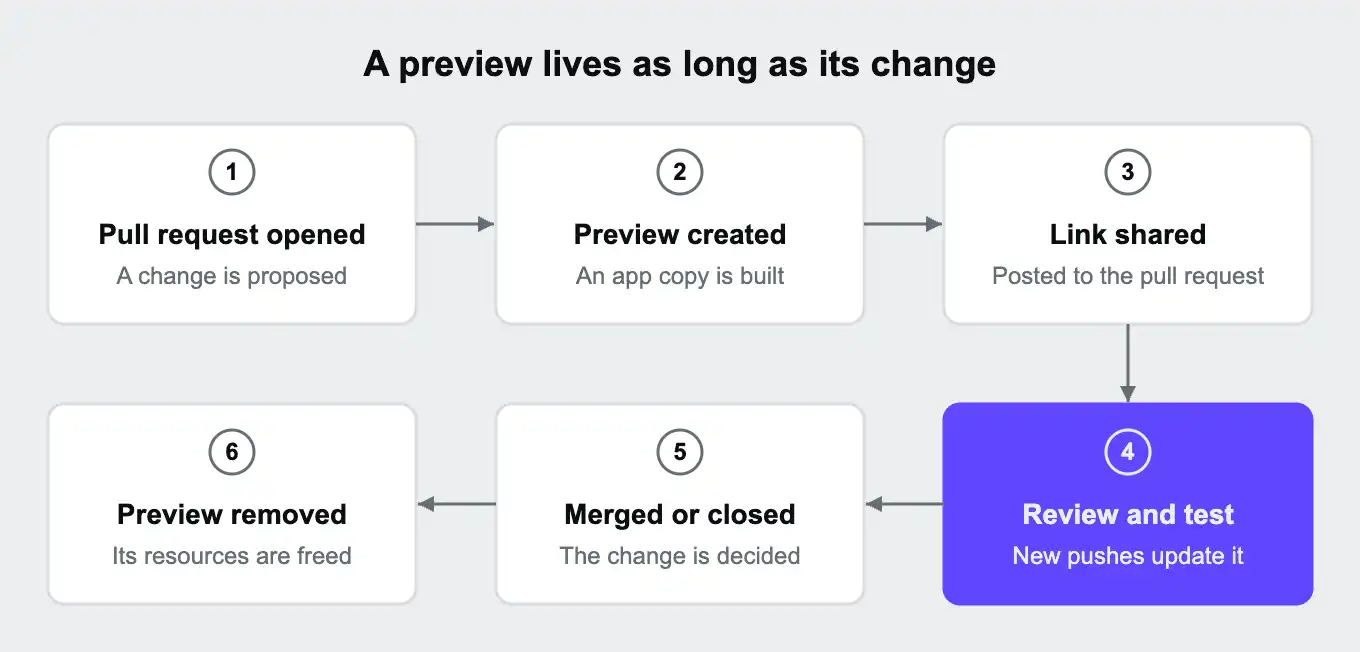
Most preview environments are tied to a Git branch or a pull request, which is a request to merge a set of changes into the main code. When someone opens a pull request, the hosting platform or a CI tool builds a fresh copy of the app with that change in it. The preview gets its own web address, and many tools post that link straight into the pull request so reviewers can find it.
While the pull request is open, every new commit the developer pushes updates the preview. Reviewers always see the latest version without asking for a redeploy. Once the pull request is merged or closed, the preview is removed so it stops using resources.
Because each preview belongs to one change, several can run side by side. Ten open pull requests can mean ten previews, each showing exactly one change, with no queue and no confusion about which change caused what.
Frontend-only vs full-stack previews
Key takeaway: a frontend-only preview shows how a change looks. A full-stack preview also shows how it behaves, because the backend, database, and services come along too.
"Preview environment" covers a wide range. At one end, a preview is just the website's frontend, the part that runs in the browser, built and published to a temporary address. It talks to a shared backend, often the staging one, or to fake data. At the other end, a preview is a copy of the whole application: frontend, backend, database, cache, search, background workers, and anything else production runs.
| Frontend-only preview | Full-stack preview | |
|---|---|---|
| What it includes | The browser-facing part of the app | Every part of the app and the services it uses |
| Good for | Layout, copy, and visual changes | Any change, including backend logic and database changes |
| Database | Shared with other previews, or fake | Its own, separate from every other environment |
| Can a change in one preview affect another? | Yes, through the shared backend | No |
| Can it test a database schema change safely? | No | Yes |
The difference shows up as soon as a change touches more than appearance. A new checkout step needs the backend to process orders. A change to how data is stored needs a database it can alter without breaking anyone else's preview. Only a full-stack preview can show those changes working before release.
For a platform-by-platform look, our comparison Preview environments in 2026: Upsun, Vercel, and Netlify compared on full-stack support covers what each one includes.
The data question: empty, seeded, or a copy of production
Key takeaway: a preview is only as trustworthy as the data inside it. A cleaned copy of production data catches problems that empty or invented data hides.
How an app behaves depends on its data as much as its code: real customer records, real product catalogs, years of edge cases nobody planned for. Even with the right code, a preview with unrealistic data can miss a bug.
There are four common ways to fill a preview's database:
| Option | What it is | Strengths | Weaknesses |
|---|---|---|---|
| Empty | A new database with no data | Simple and fast | Most features can't be tested properly |
| Seeded | Sample data generated by a script or kept in files | Predictable and safe | Rarely matches the size, shape, or messiness of real data |
| Copy of production, cleaned | Production data with personal information removed or masked | Realistic, and catches data-dependent bugs | Needs a cleaning step and enough storage |
| Shared production database | The preview reads and writes live data | None worth the risk | A bug in a preview can damage real data |
A cleaned copy of production shows whether a change will work for real users. Slow pages caused by large tables, migrations that fail on unexpected values, and layouts that break on long names all tend to appear only with real-world data.
Copying production data means handling it responsibly. Before anyone sees it, run a cleaning step, often called sanitizing, that removes or scrambles names, email addresses, and other personal details. Reviewers then work with realistic data without seeing real customers' details.
For the longer argument, see The case for preview environments with production data and Your preview environment is lying to you.
Who uses preview environments
Key takeaway: preview environments let everyone involved in a change see it working, from testers to clients.
| Who | What they use previews for |
|---|---|
| Developers | Checking a change in a production-like setting before asking for review |
| Testers and QA | Testing each change on its own, as soon as it's ready |
| Product managers and designers | Clicking through a feature before it ships, instead of reading a description |
| Clients and stakeholders | Approving work at agencies and consultancies, using a shareable link |
| AI coding agents | Running and checking their own changes against a realistic copy of the app, away from production |
Access
A preview has a real web address, so anyone who finds the link may be able to open it. Protect previews with a password or by limiting them to your company's network, especially if they hold copies of production data.
Connections to other services
A preview that sends emails, takes payments, or calls other services should use test credentials, never production ones. Otherwise a reviewer clicking through a checkout could charge a real card or email a real customer. Give previews their own settings and secrets, as our guide What are environment variables? explains.
Cost
Each running preview uses computing resources. Removing previews when pull requests close, and pausing ones nobody has touched in a while, keeps costs in line with how much the team is actually reviewing.
Preview environments vs staging vs database branching
Key takeaway: staging is one shared copy for everyone, a preview environment is one copy per change, and database branching copies only the database.
| Shared staging | Preview environment | Database branching | |
|---|---|---|---|
| How many | Usually one per project | One per branch or pull request | One database copy per branch |
| What is copied | The whole app, set up once | The app, and in full-stack previews its services and data | Only the database |
| Lifetime | Permanent | Until the change is merged or closed | Until the branch is deleted |
| Who waits | Everyone takes turns | Nobody | Nobody, for database work |
| Drift risk | High, because it's maintained over time | Low, because each copy is created fresh | Low for the database, but the rest of the app can still drift |
Preview environments often replace staging for day-to-day review, while some teams keep a staging environment for final checks that need everything running together. Our guide Dev, staging, and production environments explained covers that trade-off.
Database branching is a narrower idea. Some managed database services can create a quick copy of a database for each branch, so developers can test schema changes against realistic data. That solves the data question for the database alone. The app, its other services, and its configuration still need to come from somewhere else. A full-stack preview environment copies them too.
Preview environments on Upsun Cloud
Key takeaway: on Upsun Cloud, a preview environment is a full copy of its parent environment, including the data, created for each branch or pull request from the same configuration as production.
On Upsun Cloud, every environment is tied to a Git branch, and production is just the environment for your default branch. A preview environment is any other environment, created as a child of an existing one.
When you connect a GitHub, GitLab, or Bitbucket repository, Upsun Cloud handles the lifecycle for you. With the GitHub integration's default settings, for example:
- Opening a pull request creates an environment, with the pull request's target branch as its parent.
- The new environment gets a copy of its parent's data.
- The environment's web address is posted to the pull request, so reviewers can click straight through.
- Merging the pull request deletes the environment.
The copy is full stack. Branching an environment copies its databases, file storage, queues, and routing along with the code, and every environment is built from the same .upsun/config.yaml file, so the preview runs the same services as production. Our guide What is a YAML file? explains how to read that file.
Upsun Cloud also covers the practical points from earlier:
| Concern | How Upsun Cloud handles it |
|---|---|
| Personal data in copies | The Upsun docs include guides to sanitizing databases in preview environments, for MariaDB and PostgreSQL |
| Access | HTTP access control can protect a preview with a username and password, or allow and deny IP addresses, set in the Console or with upsun environment:http-access |
| Test credentials | Project variables hold test credentials for every environment, and production overrides them with its own environment-level variables that previews don't inherit |
| Forgotten previews | Preview environments that haven't been redeployed in 14 days are paused automatically |
To see how this works end to end, read Production clone in 45 seconds with data, files, services, everything, or see managing environments in the Upsun docs.
Frequently asked questions (FAQ)
What is the difference between a preview environment and staging?
Staging is usually one shared, long-lived copy of production that every change takes turns on. A preview environment is a short-lived copy created for a single change, so many can run at once and nobody waits.
Are preview environments the same as ephemeral environments?
Yes, the terms are used interchangeably. "Ephemeral" stresses that the environment is temporary. You may also see review apps, pull request environments, or branch environments.
Do preview environments include the database?
It depends on the tool. Frontend-only previews usually share a database or use fake data. Full-stack previews give each preview its own database, ideally filled with a cleaned copy of production data.
Is it safe to use production data in a preview environment?
It can be, if you clean it first. Remove or mask personal information before reviewers see it, protect the preview with a password or network restriction, and give it test credentials for any outside services.
How long does a preview environment last?
Typically as long as the change it was built for. Many tools remove the preview when the pull request is merged or closed, and some pause previews that haven't been used for a while.
Do preview environments cost extra?
Each running preview uses computing resources, so costs grow with the number of previews running at once. Automatic removal and pausing keep that in check.
Sources
- Manage Upsun Cloud environments, Upsun docs
- Integrate with GitHub, Upsun docs
- Sanitize databases, Upsun docs
- HTTP access control, Upsun docs
Deploy possibility.
Try Upsun for free.
Stay updated
Upsun Cloud: compliant and validated