


What is a Dockerfile? A plain-English guide
TL;DR
|
A Dockerfile is a plain text file containing step-by-step instructions for building a container image. Think of it as a recipe: it lists what to start from, what to add, and how to run the result, so anyone can produce exactly the same package of an app.
If you've opened a project and found a file called simply Dockerfile, with no extension, this guide explains how to read it. It covers how Dockerfiles, images, and containers fit together, walks through a real example, and explains when you need to write one.
Dockerfile, image, and container: how they relate
Key takeaway: a Dockerfile is the recipe, an image is what the recipe produces, and a container is that image running.
Three terms come up together, and they're easy to mix up.

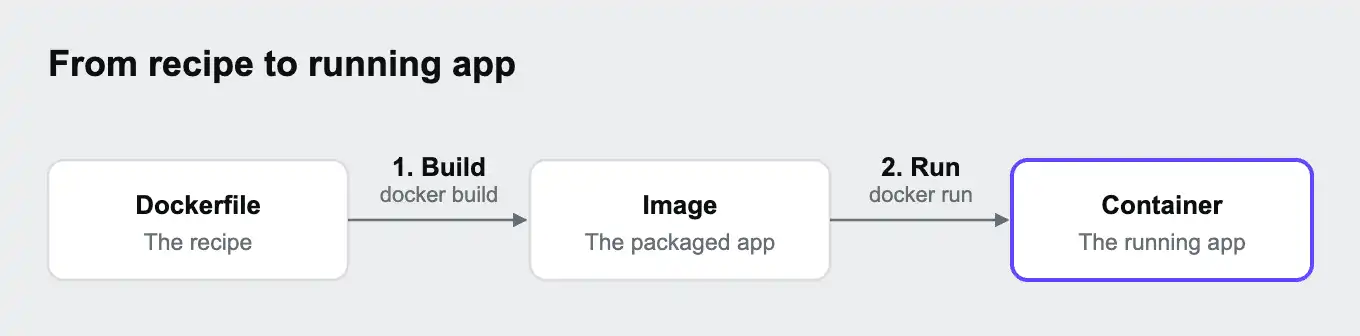
| Term | What it is | Kitchen comparison |
|---|---|---|
| Dockerfile | A text file of instructions | The recipe |
| Image | A packaged, read-only snapshot of an app and everything it needs: code, libraries, and system tools | A batch of meals, prepared and frozen |
| Container | A running copy of an image | One meal, heated and served |
You build a Dockerfile once to get an image, and you can run that image as many containers as you need. Every container from the same image starts out identical, which is the point: the app behaves the same on a developer's laptop, in a test pipeline, and on a server.
Images are also shareable. Teams publish them to registries such as Docker Hub, so others can download and run them without building anything. Many Dockerfiles start from one of these published images instead of from scratch.
A Dockerfile example, explained
Key takeaway: many Dockerfiles follow the same shape: start from a base image, add the app's dependencies and code, then say how to start it.
Here is a Dockerfile for a small Node.js web app:
FROM node:24-slim
WORKDIR /app
COPY package.json package-lock.json ./
RUN npm ci --omit=dev
COPY . .
EXPOSE 3000
CMD ["node", "server.js"]| Line | What it does |
|---|---|
FROM node:24-slim | Start from a published image that already has Node.js 24 installed. slim is a smaller variant with fewer extra tools |
WORKDIR /app | Use the /app folder inside the image for everything that follows |
COPY package.json package-lock.json ./ | Copy only the files that list the app's dependencies |
RUN npm ci --omit=dev | Install the exact dependency versions from the lock file, leaving out tools only needed during development |
COPY . . | Copy the rest of the app's code into the image |
EXPOSE 3000 | Note that the app listens on port 3000. This documents the port, and the port still has to be published when the container runs |
CMD ["node", "server.js"] | The command that starts the app when a container runs |
Copying the dependency files separately, before the rest of the code, is deliberate. Docker builds an image in layers, one per instruction, and reuses any layer whose inputs haven't changed. Copying the dependency files first means a change to the app's code doesn't trigger a full reinstall of every dependency, so rebuilds are much faster. Our guide What is a lock file? explains why that lock file matters.
The same shape works in other languages. A Python Dockerfile might start FROM python:3.13-slim and install from a requirements or lock file, and a PHP one might start from an official php image and run Composer.
The most common Dockerfile instructions
Key takeaway: about a dozen instructions cover the Dockerfiles you're likely to read. Each one is a single word in capitals at the start of a line.
| Instruction | What it does |
|---|---|
FROM | Sets the starting image. Every Dockerfile begins with it |
WORKDIR | Sets the folder inside the image where later instructions run |
COPY | Copies files from your project into the image |
ADD | Like COPY, but can also unpack archives and download from web addresses. Use COPY unless you need those extras |
RUN | Runs a command while building the image, such as installing packages |
ENV | Sets an environment variable inside the image |
ARG | Sets a value that's only available while the image is being built |
EXPOSE | Documents which port the app listens on |
USER | Switches to a different user for the instructions and commands that follow |
CMD | Sets the default command a container runs when it starts. It can be replaced when starting the container |
ENTRYPOINT | Sets the main program a container always runs. Anything in CMD is passed to it as extra options |
The difference between RUN and CMD trips people up. RUN happens once, while the image is being built. CMD happens every time a container starts from that image.
Building and running: the commands
Key takeaway: docker build turns a Dockerfile into an image, and docker run starts a container from it.
Run these from the folder that contains the Dockerfile:
| Command | What it does |
|---|---|
docker build -t myapp . | Build an image from the Dockerfile in this folder and name it myapp. The dot means "this folder" |
docker run -p 3000:3000 myapp | Start a container from the image and make port 3000 reachable at localhost:3000 |
docker run -d -p 3000:3000 myapp | The same, but in the background |
docker images | List the images on your computer |
docker ps | List running containers |
docker stop <container> | Stop a running container |
docker push <name> | Upload an image to a registry so others can use it |
When an app needs other services alongside it, such as a database, starting each container by hand with docker run gets tedious. That's what Docker Compose is for. Our guide How to use .env files with Docker Compose shows how it starts several containers together.
Common mistakes and how to avoid them
Key takeaway: the costliest Dockerfile mistakes put secrets into images or make them slow and bloated. A few habits prevent them.
Copying secrets into the image
A line like COPY . . copies everything in the folder, including a .env file full of passwords, unless you tell Docker otherwise. Anyone who gets the image can read those files. Add a .dockerignore file next to the Dockerfile. It works like a .gitignore file and keeps files out of the image:
.env
.git
node_modules
The same applies to passwords set with ENV or ARG in the Dockerfile: they stay readable in the image. Pass secrets in when the container runs instead. Our guides What is a .gitignore file? and What are environment variables? cover both sides of this.
Slow rebuilds
Copying all the code before installing dependencies means every small code change reinstalls everything. Copy the dependency files and install them first, then copy the rest, as in the example above.
Bloated images
Starting from a full base image pulls in tools the app never uses, which makes images slower to download and gives attackers more to work with. Use a slim variant where one exists. For apps that need build tools only while compiling, a multi-stage build uses one image to build the app and copies only the result into a second, smaller image.
Using a floating version
FROM node:latest or FROM node picks up whatever version is newest on the day you build, so the same Dockerfile can produce different images a month apart. Pin a version, such as node:24-slim.
Running as the administrator account
By default, containers run as the root user, which has full control inside the container. Many official base images include a regular user, and switching to it with USER limits the damage if the app is ever compromised.
The app can't be reached from outside the container
An app that only listens on 127.0.0.1 or localhost inside a container can't be reached from your browser, even with the port published. Configure it to listen on 0.0.0.0, which means "accept connections from anywhere".
When you need a Dockerfile, and when a platform builds the container for you
Key takeaway: write a Dockerfile when you're packaging your own app as a container. Some hosting platforms, including Upsun Cloud, build the container for you from a configuration file instead.
You'll want a Dockerfile when:
- You deploy to a service that runs containers you supply, such as Kubernetes or a container hosting service
- You want to publish your app as an image others can download and run
- Your local development setup runs the app in a container, often alongside Docker Compose
You may not need one when your hosting platform builds the app for you. Instead of writing build steps yourself, you describe what the app needs, such as its language version and how to start it, and the platform produces the container.
How this works on Upsun Cloud
Upsun Cloud builds your app from .upsun/config.yaml, so you don't write a Dockerfile for it. There are three ways to describe an app:
| App type | What you describe | Good for |
|---|---|---|
| Single-runtime image | One language and version, such as nodejs:26, plus build and start commands | Typical web apps |
| Composable image | Several runtimes and tools in one container, chosen from more than 120,000 packages in the Nix package collection | Apps that need extra system tools or more than one language |
| Docker image (type: docker:1) | A ready-made public image, which Upsun Cloud runs as it is | Self-hosted tools that already ship an official image |
For the Node.js app from the example above, the equivalent on Upsun Cloud is a few lines:
applications:
  app:
    type: "nodejs:26"
    web:
      commands:
        start: "node server.js"
For Node.js apps, Upsun Cloud's default build installs your dependencies with npm, so the steps your Dockerfile spelled out happen without one.
The Docker image option has limits worth knowing. Upsun Cloud doesn't build a Dockerfile from your repository for this app type. It runs an image that's already been built and published. Build hooks aren't supported, you're responsible for updating the image when its publisher releases security fixes, and the docs list Meilisearch and n8n as the images verified so far.
You can deploy on Upsun Cloud free for 15 days, with no card needed, or see how Git-driven automation builds your app from configuration.
Frequently asked questions
What is the difference between a Dockerfile and an image?
A Dockerfile is a text file of instructions. An image is what you get when you build those instructions: a packaged, ready-to-run snapshot of the app.
What is the difference between a Dockerfile and docker-compose.yml?
A Dockerfile describes how to build one image. A compose file describes how to run several containers together, such as an app, a database, and a cache. A compose file often uses a Dockerfile to build the app's own image.
Does a Dockerfile need a file extension?
No. The file is usually named exactly Dockerfile, with a capital D and no extension. You can use another name and point to it with docker build -f.
What is the difference between CMD and ENTRYPOINT?
Both set what a container runs when it starts. CMD is a default that's easy to replace when starting the container. ENTRYPOINT sets the main program, and anything in CMD is passed to it as extra options.
What is a .dockerignore file?
A file listing what Docker should leave out when copying your project into an image, such as .env files, the .git folder, and installed dependencies. It works much like a .gitignore file.
Do I need a Dockerfile to deploy my app?
It depends on where you deploy. Platforms that run containers you supply need one. Platforms that build your app from configuration, such as Upsun Cloud, don't.
Deploy possibility.
Try Upsun for free.
Stay updated
Upsun Cloud: compliant and validated