


TL;DR
|
A load balancer is a system that distributes incoming traffic across a group of servers. Instead of every visitor hitting the same machine, the load balancer sends each request to one of several identical copies of the app, so the work is shared.
It's what makes horizontal scaling possible, and it also keeps a site running when one server fails. This guide explains how load balancers work, the methods they use to choose a server, and what an app needs to work well behind one.
How a load balancer works
Key takeaway: the load balancer receives every request, picks a healthy server for it, and skips any server that's failing.

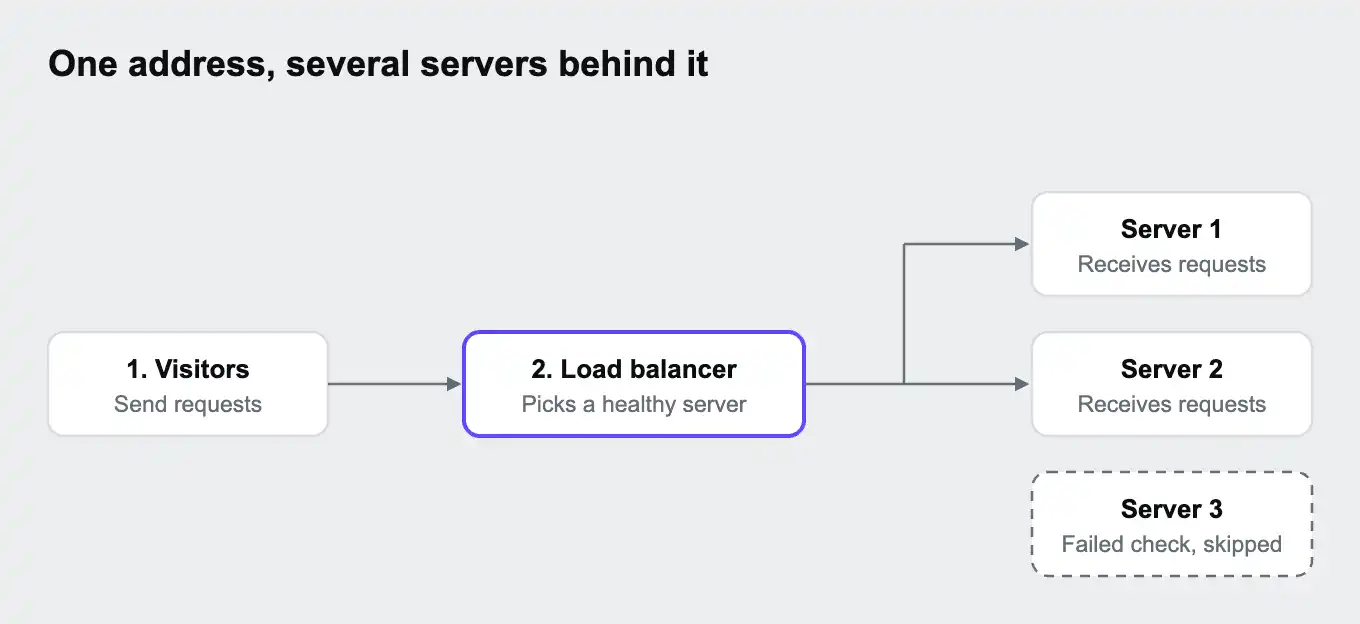
Visitors only see one address, the load balancer's. Behind it sits a pool of servers running the same app. For each request, the load balancer:
- Receives the request.
- Chooses one of the servers in the pool, using its balancing method.
- Forwards the request and passes the response back to the visitor.
At the same time, it runs health checks: regular test requests to each server. If a server stops answering properly, the load balancer takes it out of the pool and sends traffic to the others until it recovers. If every server fails, visitors see an error such as a 503. Our guide 502 Bad Gateway: what it means and how to fix it explains what each one means.
How a load balancer chooses a server
Key takeaway: simple methods spread requests evenly, and smarter ones account for how busy each server is.
| Method | How it chooses | Good for |
|---|---|---|
| Round robin | Takes turns: server 1, then 2, then 3, then 1 again | Servers of equal size handling similar requests |
| Least connections | Picks the server currently handling the fewest requests | Requests that vary a lot in how long they take |
| Random | Picks any available server | Large pools, where random choices even out over time |
| Weighted | Sends more traffic to bigger servers | Pools with servers of different sizes |
| IP hash | Uses the visitor's address to pick the same server each time | Apps that need a visitor to keep reaching the same server |
Network-level vs application-level load balancing
Key takeaway: network-level load balancers pass connections along quickly. Application-level load balancers read each request and can route it by its content.
You'll often see these called layer 4 and layer 7, after the layers of a standard networking model.
| Layer 4 (network level) | Layer 7 (application level) | |
|---|---|---|
| What it looks at | Addresses and ports | The full request, including the web address, headers, and cookies |
| What it can do | Pass connections to servers | Route /api to one group of servers and /images to another, handle HTTPS, add headers |
| Speed | Very fast, because it doesn't read the request | Slightly slower, because it does |
| Typical use | Very high traffic, or traffic that isn't web requests | Websites and web APIs |
An application-level load balancer does much of what a reverse proxy does. Our guide What is a reverse proxy? explains how the two overlap.
What your app needs behind a load balancer
Key takeaway: any server must be able to handle any request, so nothing important can live inside a single server.
Because a visitor's next request might land on a different server, the app can't rely on anything stored inside one server, such as login sessions held in memory or uploaded files saved to its disk.
Load balancers offer one shortcut: sticky sessions, which keep sending a visitor to the same server. They can paper over the session problem, but they make the load uneven and fail when that server goes down, so storing sessions in a shared place is the more reliable fix.
Common load balancers
Key takeaway: you can run load balancing software yourself, or use the one built into a cloud or hosting platform.
| Type | Examples |
|---|---|
| Software you run yourself | Nginx, HAProxy, Traefik, Envoy |
| Cloud provider services | AWS Elastic Load Balancing, Google Cloud Load Balancing, Azure Load Balancer |
| Built into a hosting platform | Platforms that spread traffic across your app's instances for you |
| Hardware | Dedicated devices, mostly in large company data centers |
Load balancing on Upsun Cloud
Key takeaway: on Upsun Cloud, the router spreads requests across your app's instances automatically. You choose how many instances run, and there's no load balancer to set up.
Every request to an Upsun Cloud project passes through a router, which also does the load balancer's job. According to the Upsun docs, when an app runs as several instances, the router randomly distributes requests to the available instances.
| What you control | How |
|---|---|
| How many instances run | upsun resources:set --count myapp:3, or in the Console |
| Adding and removing instances automatically | Autoscaling, based on CPU or memory use |
| When a new instance starts receiving traffic | A post_start command runs before the instance is added to the router, so you can check the app is ready first |
| Shared files across instances | Files on storage mounts are shared between instances, while instance and tmp mounts are separate for each |
The random spread means sessions and uploads need to live somewhere shared, as described above. A Redis or Valkey service for sessions and a storage mount for files cover the usual cases. Our guide What is autoscaling? explains how the number of instances can follow traffic.
You can deploy on Upsun Cloud free for 15 days, with no card needed, or see how scaling and performance work on Upsun Cloud.
Frequently asked questions
What does a load balancer do?
It spreads incoming requests across several servers, so no single one is overwhelmed, and stops sending traffic to servers that fail.
What is the difference between a load balancer and a reverse proxy?
A load balancer focuses on spreading traffic across servers. A reverse proxy is a broader role that can also handle HTTPS, caching, and routing. Many tools, such as Nginx, can do both.
What is a health check?
A regular test request a load balancer sends to each server. Servers that fail it are taken out of the pool until they recover.
What are sticky sessions?
A setting that keeps sending a visitor to the same server. It helps apps that store sessions in memory, but it makes the load uneven and fails when that server goes down.
Do I need a load balancer with one server?
Not for spreading traffic. Some setups still use one in front of a single server, to handle HTTPS or make adding servers later easier.
Does Upsun Cloud include a load balancer?
Yes, in effect. The Upsun Cloud router spreads requests across an app's instances automatically, so there's nothing separate to set up.
Deploy possibility.
Try Upsun for free.
Stay updated
Upsun Cloud: compliant and validated